
I'm looking forward to what Google offer in the netbook area. I currently use Linux on every machine I use and it works perfectly, but I'm also open to see what others do with Open Source, and that is the real answer here. I have noticed a lot of hostile posts by people who fear this, I can't fathom why. I use Eeebuntu on my netbook, and it works perfectly, as you will know I work on the team, but maybe in the future we could change our base distro, so that is why I find it so interesting.
It is not just Linux , it is it's Open Source underpinnings that will eventually change the current monopoly situation, not just one distro or one implementation. Microsofts biggest problem is there uni hardware architecture approach, Open Source embraces all architectures, and that is what will change the Status Quo. In large part this is one of the great benefits we are derive from Debians efforts.
I have looked at getting a new Google phone as I like the interface, but I'm waiting to see what other handsets it's going to launched on first, choice is a good thing.
Showing posts with label eeepc. Show all posts
Showing posts with label eeepc. Show all posts
Friday, 6 March 2009


Saturday, 28 February 2009
Ubuntu 9.04 Alpha 5 - netbook friendly
As you will be aware I work on the eeebuntu distro which is linked very closely to the Ubuntu distro, as that is what it is built upon.
So part of our work is to look at what is coming down the pipe in their next release to see how we can build on that and make it and even better experience for our users.
Until recently, Ubuntu has not been that friendly out of the iso towards some of the hardware we support, to such an extent we have had to replace the kernel and modify settings etc to make the whole experience more user friendly.
It has been stated that Ubuntu will be making efforts to make the next release more netbook friendly and on first impressions of this release they have certain made steps forward.
I am testing it on an Eeepc 1000, with 2GB of RAM and using a Kingston 2GB USB pen drive to run it from. The performance from the USB drive is very acceptable, and the hardware detection of the important netbook components was perfect. I'm posting this from that environment, so it is proof that the wifi card has been detected. I had problems with the previous version with 1000's mouse pad and two finger scrolling, both of these haave been fixed.
They have also disabled the CTRL-ALT backspace key combination to stop neew users reseting their X sessions by mistake, a good move in my opinion. They have also implemented the new notification system, which looks very impressive ,and hopefully this can be built upon for other uses. The new kernel 2.6.28, has obviously been compiled with many of the netbook requirements built in, so this makes testing it far easier.
I would definitely recommend installing it onto a USB drive and taking it for a spin to see what you think. The more eyes looking at the early builds, the more bugs can be found , and the better the final release will be.
Jaunty 9.04 Alpha
So part of our work is to look at what is coming down the pipe in their next release to see how we can build on that and make it and even better experience for our users.
Until recently, Ubuntu has not been that friendly out of the iso towards some of the hardware we support, to such an extent we have had to replace the kernel and modify settings etc to make the whole experience more user friendly.
It has been stated that Ubuntu will be making efforts to make the next release more netbook friendly and on first impressions of this release they have certain made steps forward.
I am testing it on an Eeepc 1000, with 2GB of RAM and using a Kingston 2GB USB pen drive to run it from. The performance from the USB drive is very acceptable, and the hardware detection of the important netbook components was perfect. I'm posting this from that environment, so it is proof that the wifi card has been detected. I had problems with the previous version with 1000's mouse pad and two finger scrolling, both of these haave been fixed.
They have also disabled the CTRL-ALT backspace key combination to stop neew users reseting their X sessions by mistake, a good move in my opinion. They have also implemented the new notification system, which looks very impressive ,and hopefully this can be built upon for other uses. The new kernel 2.6.28, has obviously been compiled with many of the netbook requirements built in, so this makes testing it far easier.
I would definitely recommend installing it onto a USB drive and taking it for a spin to see what you think. The more eyes looking at the early builds, the more bugs can be found , and the better the final release will be.
Jaunty 9.04 Alpha
Tuesday, 27 January 2009
Microsoft's malaise
Unless you have just returned from Mars you will have heard about the massive drop in revenue for the once omnipotent software manufacturer, with the inevitable sacking of 5,000 staff and 15% of it's temporary/contract staff, my heart goes out to those guys.
I have be discussing this with friends for a long while, and this is not remotely surprising to me, just the length of time it has taken for the adjustment. I will caveat everything else I discuss here with the facts that in the last quarter, Microsoft still made 3 billion, so it is not even vaguely likely to be going bust any time soon, but the rate of descent is going to accelerate.
However, it has become apparent for several years that they have stopped innovating and are constantly late to the party with every product. Vista, was five years late, and what a mess, it couldn't have been more out of tune with the hardware paradigm shift that was taking place in 2008.People wanted greener, smaller, compact machines, that did just enough web stuff to make them useful, with excellent battery life. What were the people at Redmond doing to have missed an entire market that last year should millions of units, not very much obviously.
Cloud computing has been around for a while, and to be fair MS had a simply offering in the early days, namely Hotmail, but they just didn't develop it or move it forward at all in any meaningful way, so along comes Google and steals all their clothes. Again they are now trying to play catchup again. Where are all the bolt on apps and services that you now get with Google?
Internet Explorer, through it's monopoly installation on every machine sold, held a 95% market share once, that is now down to under 70% and falling rapidly as Mozilla,Opera,Safari and Google Chrome all take large chunks out of the pie. IE7 was a bad copy of Firefox, and people have just been moving away in their millions. According to spread firefox, today will see 800,000,000 downloads of the Firefox software.
They have released Office 2007 , without really talking to the customers and again there has been a lot of negative feedback about thee new ribbon look. Customers who use 10% of the functionality of this product have started asking why do I need a new version, what is it offering me for all the time and effort required to change. Many have moved to open office, and are now very happy knowing they will never be forced to upgrade.
Recently we have seen yet another round of nasty worms and viruses hit the base operating system, causing businesses lots of expenses on upgrades, checking their defenses etc etc. No operating system is free of problems, but if you use Microsoft products, the problems are relentless and continuous.
When you role all of these issues up, they do start to show the picture of a very large company who is starting to do things by committee, and all of these symptoms reflect that. As IBM before them, I now fully expect them to still be around but slowly move into the technology background. As many people have invested heavily in their technology, you are not about to throw that out, but they have become less and less relevant as a technology innovator.
The future is with the open source, and as more and more companies shift away from the Microsoft proprietary lock in, and the costs savings that spring from that. The cost savings with open source virtualisation being offered by companies like Amazon and Google show us clearly where and how the shift is happening in the cloud. With Netbooks costing £150 , why would you possibly want to spend £350 on Microsoft office? The desktops will go the same way, with massive energy savings and cost savings on applications. With the current economic problems, businesses will take no FUD while their competitors are making use of those massive cost savings.
The IT landscape is definitely changing and the role that Microsoft are going to play in that will change. The role for open source is increasing on a daily basis in every area, and that snowball is only gaining momentum.
I have be discussing this with friends for a long while, and this is not remotely surprising to me, just the length of time it has taken for the adjustment. I will caveat everything else I discuss here with the facts that in the last quarter, Microsoft still made 3 billion, so it is not even vaguely likely to be going bust any time soon, but the rate of descent is going to accelerate.
However, it has become apparent for several years that they have stopped innovating and are constantly late to the party with every product. Vista, was five years late, and what a mess, it couldn't have been more out of tune with the hardware paradigm shift that was taking place in 2008.People wanted greener, smaller, compact machines, that did just enough web stuff to make them useful, with excellent battery life. What were the people at Redmond doing to have missed an entire market that last year should millions of units, not very much obviously.
Cloud computing has been around for a while, and to be fair MS had a simply offering in the early days, namely Hotmail, but they just didn't develop it or move it forward at all in any meaningful way, so along comes Google and steals all their clothes. Again they are now trying to play catchup again. Where are all the bolt on apps and services that you now get with Google?
Internet Explorer, through it's monopoly installation on every machine sold, held a 95% market share once, that is now down to under 70% and falling rapidly as Mozilla,Opera,Safari and Google Chrome all take large chunks out of the pie. IE7 was a bad copy of Firefox, and people have just been moving away in their millions. According to spread firefox, today will see 800,000,000 downloads of the Firefox software.
They have released Office 2007 , without really talking to the customers and again there has been a lot of negative feedback about thee new ribbon look. Customers who use 10% of the functionality of this product have started asking why do I need a new version, what is it offering me for all the time and effort required to change. Many have moved to open office, and are now very happy knowing they will never be forced to upgrade.
Recently we have seen yet another round of nasty worms and viruses hit the base operating system, causing businesses lots of expenses on upgrades, checking their defenses etc etc. No operating system is free of problems, but if you use Microsoft products, the problems are relentless and continuous.
When you role all of these issues up, they do start to show the picture of a very large company who is starting to do things by committee, and all of these symptoms reflect that. As IBM before them, I now fully expect them to still be around but slowly move into the technology background. As many people have invested heavily in their technology, you are not about to throw that out, but they have become less and less relevant as a technology innovator.
The future is with the open source, and as more and more companies shift away from the Microsoft proprietary lock in, and the costs savings that spring from that. The cost savings with open source virtualisation being offered by companies like Amazon and Google show us clearly where and how the shift is happening in the cloud. With Netbooks costing £150 , why would you possibly want to spend £350 on Microsoft office? The desktops will go the same way, with massive energy savings and cost savings on applications. With the current economic problems, businesses will take no FUD while their competitors are making use of those massive cost savings.
The IT landscape is definitely changing and the role that Microsoft are going to play in that will change. The role for open source is increasing on a daily basis in every area, and that snowball is only gaining momentum.
Wednesday, 14 January 2009
Six months with my Eeepc 1000 and still very happy
Yes, it's been that long since I upgraded my netbook, and I can honestly say there has not been one second of regret. Looking at the prices you can get them for today, it might have been worth waiting until after Christmas, but that is always true of all technology , and you would probably end up getting nothing.
In my previous post on this great little machine , I mentioned that I had upgraded from my original 701 model to get a couple of issues sorted, screen size and keyboard size being the main ones. These have proved to be successfully cured and are now a none issue on this netbook. One major added bonus is the increase in battery life , which really does deliver 5.5hrs after every charge.
The operating system that came pre-installed worked effectively enough , Xandros, and had all the applications one could possibly want in a netbook style computer. It would make sense for most people who just want a netbook to get some work done effectively and without much fuss to leave it at that.I however have now switched all my machines over the last twelve months to using Debian derived Ubuntu Linux, and I really wanted to install this on my 1000.
After much searching of the web and playing with various versions, I have now become formally involved with Eeebuntu Linux for the eeepc's and I have to say it really makes this little PC shine. I think one of the unsung heroes of the efforts to successfully using Ubuntu on this platform is Adam, who has put in a considerable amount of effort to make sure as much as possible works out of the iso.
To be fair , the main Ubuntu project has also made our lives over at Eeebuntu HQ much easier with the introduction of the USB key installer with the latest release of Ubuntu, 8.10. This utility makes trying out as many distro's as you like on the Eeepc as simple as possible. I would certainly recommend people to test drive the new environment from a USB stick before installing to make sure they like it.
Have I found any problems with this netbook? Well not with the unit itself, but with the fact that the very latest netbooks now have 3G capabilities built in, rather than having to use a USB modem. The 1000 works perfectly with them, but it does make it so much tidier to have the SIM card internal to the device, but thats being really picky. Apart from that, I can't think there is much I would change. The black case can show your figure marks from time to time, but nothing a cloth can't rectify in moments and I'm really straining here to make that point.
So in conclusion, I'm very glad I bought this unit, use it regularly and will continue to do so until someone comes up with a netbook that has everything this one does , plus some features that make me take notice. That hasn't happened yet, and I suspect it will be a complete technology refresh from the underlying components, like a new more efficient Intel processor that will cause this to happen. It could be a touch screen, although I'm not convinced that would be that useful on these machines, but I would be prepared to take a look.
In my previous post on this great little machine , I mentioned that I had upgraded from my original 701 model to get a couple of issues sorted, screen size and keyboard size being the main ones. These have proved to be successfully cured and are now a none issue on this netbook. One major added bonus is the increase in battery life , which really does deliver 5.5hrs after every charge.
The operating system that came pre-installed worked effectively enough , Xandros, and had all the applications one could possibly want in a netbook style computer. It would make sense for most people who just want a netbook to get some work done effectively and without much fuss to leave it at that.I however have now switched all my machines over the last twelve months to using Debian derived Ubuntu Linux, and I really wanted to install this on my 1000.
After much searching of the web and playing with various versions, I have now become formally involved with Eeebuntu Linux for the eeepc's and I have to say it really makes this little PC shine. I think one of the unsung heroes of the efforts to successfully using Ubuntu on this platform is Adam, who has put in a considerable amount of effort to make sure as much as possible works out of the iso.
To be fair , the main Ubuntu project has also made our lives over at Eeebuntu HQ much easier with the introduction of the USB key installer with the latest release of Ubuntu, 8.10. This utility makes trying out as many distro's as you like on the Eeepc as simple as possible. I would certainly recommend people to test drive the new environment from a USB stick before installing to make sure they like it.
Have I found any problems with this netbook? Well not with the unit itself, but with the fact that the very latest netbooks now have 3G capabilities built in, rather than having to use a USB modem. The 1000 works perfectly with them, but it does make it so much tidier to have the SIM card internal to the device, but thats being really picky. Apart from that, I can't think there is much I would change. The black case can show your figure marks from time to time, but nothing a cloth can't rectify in moments and I'm really straining here to make that point.
So in conclusion, I'm very glad I bought this unit, use it regularly and will continue to do so until someone comes up with a netbook that has everything this one does , plus some features that make me take notice. That hasn't happened yet, and I suspect it will be a complete technology refresh from the underlying components, like a new more efficient Intel processor that will cause this to happen. It could be a touch screen, although I'm not convinced that would be that useful on these machines, but I would be prepared to take a look.
Monday, 29 December 2008
Eeebuntu - latest version has been released
I work with a team of like minded people to deliver a really good looking and useful version of Ubuntu specifically designed for the Asus Eeepc netbook computer.
Well we have just released a new version for your Eeepc, which comes in three flavours:
1) Standard - which comes with a good base of pre-installed applications.
2) Base - which comes with the bare minimum, so you can add the applications you want
3) NBR - which uses the new Ubuntu mini computer interface
Jump over to our web site Eeebuntu web site and download the iso and have a look.
The easiest way to try it first is to install the iso file onto a USB stick. The easiest way to do that is to use another machine with Ubuntu installed as it now comes with a built in USB key creator application. If you don't have that, then use the unetbootin application.
Have fun , and post your comments etc on our forums.
Well we have just released a new version for your Eeepc, which comes in three flavours:
1) Standard - which comes with a good base of pre-installed applications.
2) Base - which comes with the bare minimum, so you can add the applications you want
3) NBR - which uses the new Ubuntu mini computer interface
Jump over to our web site Eeebuntu web site and download the iso and have a look.
The easiest way to try it first is to install the iso file onto a USB stick. The easiest way to do that is to use another machine with Ubuntu installed as it now comes with a built in USB key creator application. If you don't have that, then use the unetbootin application.
Have fun , and post your comments etc on our forums.
Saturday, 13 September 2008
When is a netbook not a netbook?

Well the rumoured new Dell 12" netbook appears to be on it's way to the UK with a nice new shiny 12" screen and an extremely attractive price. It has everything that the Asus 1000 does, but the CPU speed does look a little odd, but that could well be how the price is being kept down. It's hard to see if this model won't have the function keys like it's smaller brother, but counting the rows of keys on the photo, it would appear not to. The size is obviously increased to house the new screen , and this then raises my question, what are the properties that really define this new genre.
What if Apple launched a 17" version, with the same general internals, a minor tweak here and there, it would appear that it is not the screen size, but the components inside that are defining the standard. Low power usage, battery efficient, enough horsepower to write your blog, this is being done on my 1000, and surf the web, but not enough to play very heavy games , compile new programs or act as a music studio.
It is clearly not the size of the unit that is defining what and where these great little machines will be put to use, but the solid state disk drives and the Intel Atom processors. This is great news for people who have been sitting on the fence waiting to see where this market moves, as I fully suspect we have not seen anywhere near the end of the morphing that can and will occur.
Another positive affect of all these new releases is that the original units prices are only heading in one direction, which makes them more affordable for everyone, and gives Linux even greater exposure. It also raises a nasty spectre for microsoft, as who is going to want pay them £300 for office, when the entire machine only costs £100, their pricing model just doesn't work in this sector.
It also gives Linux one of the best platforms it has ever had, as every netbook sold worldwide now supports Linux guaranteed, no worrying about drivers, they will all just work. This has worked really well for MAC's, and will work just as well for Linux.
The Link to the Tesco Site
Saturday, 6 September 2008
Disappointing launch of new Dell netbook
Like many others with an interest in the mini laptop market, I have followed the rumours and gossip around the new Dell inspiron mini 9 with a watchful eye. So last week is was announced and I nipped over to the Dell web site to order one with Ubuntu pre-installed. I know I have an Eeepc 1000 which I love and am using now to enter this blog. However, I wanted to have a look at this new Dell, and if the rumours were true, then it would only cost me 200 UK pounds.
Well what a disappointment was waiting for me at the Dell site. The only units that were for sale had windows XP home, which is next to useless, even if you love windows. The price was also a real shocker in to the bargain, they wanted 299 UK pounds for this unit, which is only 60 pounds cheaper than my Eeepc. That is a lot of money for a machine that offers nothing over the Asus unit, has a smaller screen, no function keys, a much smaller internal solid state harddisk (16GB as compared to 40GB), and no decent productivity software pre-installed.
I suppose they would argue that they are selling these in competition to the Asus 901, which has a similar specification , but then I found that the argument for the 901 didn't stack up against the 1000 unit either.
I like Dell machines, and bought one of the XPS1330n with Ubuntu as soon as they were released. However I have always believed you should tell it like it is, and I think they have really dropped an opportunity here, and could pay for it. Time as always will be the judge of that one.
If you are looking to get yourself one of these little netbooks definitely do yourself a favour and check out the Asus 1000 if you want the best size screen in the class or the Acer Aspire one if you decide on a 9" screen version. The former offers you a much larger machine for you money and the later offers you much better value for money with the same specifications.
Well what a disappointment was waiting for me at the Dell site. The only units that were for sale had windows XP home, which is next to useless, even if you love windows. The price was also a real shocker in to the bargain, they wanted 299 UK pounds for this unit, which is only 60 pounds cheaper than my Eeepc. That is a lot of money for a machine that offers nothing over the Asus unit, has a smaller screen, no function keys, a much smaller internal solid state harddisk (16GB as compared to 40GB), and no decent productivity software pre-installed.
I suppose they would argue that they are selling these in competition to the Asus 901, which has a similar specification , but then I found that the argument for the 901 didn't stack up against the 1000 unit either.
I like Dell machines, and bought one of the XPS1330n with Ubuntu as soon as they were released. However I have always believed you should tell it like it is, and I think they have really dropped an opportunity here, and could pay for it. Time as always will be the judge of that one.
If you are looking to get yourself one of these little netbooks definitely do yourself a favour and check out the Asus 1000 if you want the best size screen in the class or the Acer Aspire one if you decide on a 9" screen version. The former offers you a much larger machine for you money and the later offers you much better value for money with the same specifications.
Friday, 5 September 2008
Linux netbooks selling extremely well in the UK
Having checked the latest bestseller charts on Amazon over the last two weeks there is one obvious fact that jumps out at you, and that is the rise and rise of the Linux netbook computer. Only this morning, the number one selling unit is the Acer Aspire One with Linpus Linux, and 50% of the top 10 have Linux pre-installed. I also think that Acer have got their pricing spot on, and are making a few other competitors, Dell, look very flat footed.
I think this market is very well suited to Linux, as the crippled version of windows XP home that is supplied on this machines is far less compatible with a modern working environment than is Linux. The powerful facilities offered by Linux , like a built in full feattured office suite, and much better connectivity to a corporate network bode well.
It is refreshing to see this change in the UK, as Britons are conservative by nature, and have had microsoft products stuffed down their throats for so long in school and work, that they seem almost joined at the hip. It is always amazing to me to see the surprise on peoples faces when they see just how powerful and user friendly modern Linux is.
It is good to see choice has broken out in this sector, which is excellent news for everyone, including the microsoft lovers, as they are now going to have to innovate in this sector to stay competitive, as XP is not going to be around for ever, and vista is deader than the dinosaurs, which it truely resembles.
I think this market is very well suited to Linux, as the crippled version of windows XP home that is supplied on this machines is far less compatible with a modern working environment than is Linux. The powerful facilities offered by Linux , like a built in full feattured office suite, and much better connectivity to a corporate network bode well.
It is refreshing to see this change in the UK, as Britons are conservative by nature, and have had microsoft products stuffed down their throats for so long in school and work, that they seem almost joined at the hip. It is always amazing to me to see the surprise on peoples faces when they see just how powerful and user friendly modern Linux is.
It is good to see choice has broken out in this sector, which is excellent news for everyone, including the microsoft lovers, as they are now going to have to innovate in this sector to stay competitive, as XP is not going to be around for ever, and vista is deader than the dinosaurs, which it truely resembles.
Wednesday, 3 September 2008
Googles new browser shows potential - but is it just the start of something bigger?
I suppose a lot of people were caught off guard with the launch on Monday of Googles' new Chrome internet browser. There have been rumours coming out of California for a while about projects they were working on, a Linux OS being the loudest , outside of the published labs site, but this caught me by surprise.
Unfortunately for someone who only uses Linux on all of his machines, I had to dust off my VMware virtual machine with windows XP , to install this beta. Google have told me that they are working hard on the MAC and the Linux versions and they will be delivered soon, but we shall see. If you go to the download site with a Linux browser you can register your email address to be updated when it is ready. Register for Linux version
The install was very painless, and because every person in the office had downloaded the beta, the install executable was already in the networks proxy cache, so it was almost instantaneously retrieved. Installing it was a matter of closing the browser you originally used to download it, so chrome could grab the bookmarks etc, and that was it. As an aside I would recommend reading the comic book introduction to chrome as it does contain some very interesting information on how the browser fits together. I especially like the sandbox security segregation of each tab, and the fact the whole project is open source, and based on the great work of the KDE developers in the form of Webkit.
The first thing that really hits you is the speed of the browser, especially as I was running this in a virtual machine. As this is an early beta it can only improve over time, and must be a real concern for IE8 which is already getting a reputation as being bloated and slow. The interface is uncluttered, which I liked, and the trusty old combo of Ctrl-T gives you a new tab. These tabs are easily moved around , and can be dragged into new windows if you want. The ability to look at the resources that each tab is using is very handy, just by pressing Shift-Escape. You can then click on the nerd button to have a look in more detail. The chrome configuration options offers the usual settings, including the proxy you use, SSL certificates etc.
There is an incognito tab selection, which means that once you kill that tab, all browsing history gets destroyed, and Google says that you might use this for buying flowers for your loved one, I'm sure there are other uses no doubt.The new single URL bar does indeed work well, with anything you type bringing up previously loaded web pages or Google searches. It also remembers searches you did while on Amazon for instance, so they also will appear when you start typing in the bar.
At the time of righting there didn't appear any easy way to install extensions, RSS feeds or manage bookmarks, like Firefox allows, but I'm sure this is coming. Adobe Flash installed easily enough so I can't imagine the guys at Google have left this out of their plans. You can also set-up web application launchers from the options menu, so you can have one-click access to Gmail for instance. This is very similar to Mozilla prism, so not that ground breaking
This is just a first look, and once it is available on Linux, and there are a decent amount of extensions I will take another look and see how it compares with Firefox 3, which to be fair is still a fantastic browser, and the browser I will continue to use for the foreseeable future.
I do think though this raises some very interesting technical and strategic issues. This browser has to be one of the most powerful and technically advanced yet delivered by anyone, and it would not take that much effort to put a small virtual layer underneath it to offer a full solution for SaaS or webapps. This would then create an environment that does not need a monster Intel PC to run on, and could use an Eeepc 1000 or a Dell 910 Inspiron for instance. Could this be one of the pieces with Google Gears that needed to fall into place for Google to offer an extremely lightweight Operating System with embedded Browser? I for one will be watching this part of the potential development space very closely.
Unfortunately for someone who only uses Linux on all of his machines, I had to dust off my VMware virtual machine with windows XP , to install this beta. Google have told me that they are working hard on the MAC and the Linux versions and they will be delivered soon, but we shall see. If you go to the download site with a Linux browser you can register your email address to be updated when it is ready. Register for Linux version
The install was very painless, and because every person in the office had downloaded the beta, the install executable was already in the networks proxy cache, so it was almost instantaneously retrieved. Installing it was a matter of closing the browser you originally used to download it, so chrome could grab the bookmarks etc, and that was it. As an aside I would recommend reading the comic book introduction to chrome as it does contain some very interesting information on how the browser fits together. I especially like the sandbox security segregation of each tab, and the fact the whole project is open source, and based on the great work of the KDE developers in the form of Webkit.
The first thing that really hits you is the speed of the browser, especially as I was running this in a virtual machine. As this is an early beta it can only improve over time, and must be a real concern for IE8 which is already getting a reputation as being bloated and slow. The interface is uncluttered, which I liked, and the trusty old combo of Ctrl-T gives you a new tab. These tabs are easily moved around , and can be dragged into new windows if you want. The ability to look at the resources that each tab is using is very handy, just by pressing Shift-Escape. You can then click on the nerd button to have a look in more detail. The chrome configuration options offers the usual settings, including the proxy you use, SSL certificates etc.
There is an incognito tab selection, which means that once you kill that tab, all browsing history gets destroyed, and Google says that you might use this for buying flowers for your loved one, I'm sure there are other uses no doubt.The new single URL bar does indeed work well, with anything you type bringing up previously loaded web pages or Google searches. It also remembers searches you did while on Amazon for instance, so they also will appear when you start typing in the bar.
At the time of righting there didn't appear any easy way to install extensions, RSS feeds or manage bookmarks, like Firefox allows, but I'm sure this is coming. Adobe Flash installed easily enough so I can't imagine the guys at Google have left this out of their plans. You can also set-up web application launchers from the options menu, so you can have one-click access to Gmail for instance. This is very similar to Mozilla prism, so not that ground breaking
This is just a first look, and once it is available on Linux, and there are a decent amount of extensions I will take another look and see how it compares with Firefox 3, which to be fair is still a fantastic browser, and the browser I will continue to use for the foreseeable future.
I do think though this raises some very interesting technical and strategic issues. This browser has to be one of the most powerful and technically advanced yet delivered by anyone, and it would not take that much effort to put a small virtual layer underneath it to offer a full solution for SaaS or webapps. This would then create an environment that does not need a monster Intel PC to run on, and could use an Eeepc 1000 or a Dell 910 Inspiron for instance. Could this be one of the pieces with Google Gears that needed to fall into place for Google to offer an extremely lightweight Operating System with embedded Browser? I for one will be watching this part of the potential development space very closely.
Sunday, 31 August 2008
The Eeepc 1000 - what a great machine
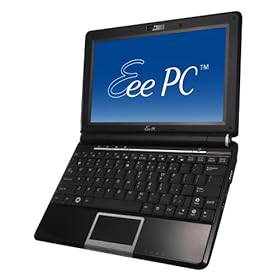
Well , when the whole idea surfaced of mini-laptops , netbooks, UMPC's or whatever your favourite description is for these little PC's is, I thought they could have a great future. Like most people who have worked in IT for many years however, I have heard enough hot air and vapourware announcements to power a hot air ballon around our Galaxy for several millennium. Caution was definitely the order of the day.
It was then with delight that the initial Eeepc 701 that I bought proved to be so useful, and became an immediate favourite. It did have a few limitations, which while not show stoppers, could definitely be improved upon. It was not therefore much of a surprise when Intel and VIA announce new CPU's designed specifically for these new type of machines, they would offer increased battery life for the unit, one of my initial limitations. The other two important things I thought would make these machines a real winner for a much wider audience , were a larger screen and a bigger keyboard.
So about the turn of the year the announcements started, with everyone in Asia it appeared about to launch such an improved device. I looked at all of them with a keen eye, to see if they could offer me the improvements I was looking for. If you looked around, with the likes of HP, MSI, Dell, Acer etc etc, there was a large array of Linux machines going to be made available. I have to say that the Acer Aspire One and the Eeepc 901 both came close, the price being one very important consideration. However, if I was going to replace the original 701, then the new unit had to offer everything I wanted.
Well, Asus then announced their new 1000 series units, with 40GB SSD disk space, 10" screen, Intel Atom processor that seemed to run on fresh air compared to the previous Celeron. A larger keyboard was also something that I would appreciate, and when the price was announced, they were not that much more expensive that their smaller brother the 901.
I have to say the extra expenditure was well worth it, and this new unit has offered the extra facilities that I wanted. Time will tell if there are any little issues that will come out of the woodwork to annoy me, but in the first three weeks, everything I have found out about the unit has been very positive. The increase in battery life is truly exceptional, and delivers 5.5 hrs without fail. The suspend and resume just works with the wifi just reconnecting and the ability to just identify a T-mobile 3G USB key and connect was very impressive. The unit is a little heavier than the 701, but the extra facilities more than compensate for that. Browsing the web and writing documents on the move is a breeze, reading my many digital books is also a real pleasure with the extra screen size. There must be several large laptop manufacturers ripping these little units to pieces in their labs to find out how the heck they do it for this price point. One of the nice new features of this unit is the small row of extra function keys just under the screen. They allow you to change the power usage of the machine, turn off the screens backlight , zoom the screen and start Skype, with just a push of a single button. The two on the right are user definable and can be changed with a built in utility. The addition of bluetooth functionality will be useful to some, but I have to say I have yet to find a use for it.
The software has changed a lot with this release, and Open office has been replaced by Sun's Star Office, which is basically Open Office with some template and filter additions. This move does puzzle me as Star Office is not normally a free item. It could have more to do with the good publicity these units are receiving, so millions of users will get to see Sun's offering. Only Xandros and Sun would know for sure.There have been more games added and I particularly like Mahjong, one of my favourites. Asus have done a deal with Yostore for on-line file storage, which it appears is only available to 901/1000 users. This is again though a service I have never up to now found that useful, but time will tell. It would have been nice to see the version of KDE be bumped up to 3.5, as I use the advanced desktop, when not running Ubuntu from a USB key. It would be really useful if everything worked with Ubuntu, but as I write this it doesn't, and that is one of this units strong points, so I will wait until it does. I have added a few Xandros repositories, which allows me to install some new applications, so all is not lost in the mean time.
I also feel that in the weeks to come with the new Dell 910 Inspiron machine about to be launched that the competition for Linux netbooks that just work is going to intensify. This is excellent news for people who want to start using machines with a low price point of entry and an even better price point for the software they want to run on them. There is no doubt that this choice can only be good for the consumer, as there is now a genuine third way to use an Intel PC. I have felt for a long time that Michael Dell has been totally fed up bowing to the demands of Microsoft, and would have loved the opportunity to use Apples OSX on a line of Dell machines. Being the logical and sensible person he is, it was obvious for selfish reasons, Apple were never going to allow this to happen. Their premium priced hardware is part of their strategy, and it is not something they will give up lightly. He has however discovered a new and better way to achieve this, and Linus Torvalds gave him the answer in the form of Linux. He now has a new and very powerful bargaining chip , and it will be interesting to see how this gets used. The other netbook manufacturers are not going to just give their market share to Dell, but competition can only be good for the products that get produced.
Sunday, 11 May 2008
Eeepc addons will spark even better Linux supported hardware
While going through my daily technology feeds, I noticed a news item on the new TV adapter that Asus has launched, it's called the ASUS My Cinema-U3100Mini. Now if you look at the operating systems it supports, it includes Debian Linux, which you might know is the basis for a lot of the modern Linux distributions we all use today. These include Xandros, the operating system that comes standard with the Epc , the ever popular K/X/Ubuntu range of operating systems, Mint Linux, and Mepis. All of these are in the top twenty of Distrowatch, which gives a reasonable idea of what people are using.
Now it becomes obvious, even by Asus's conservative projection of expected shipments of Epc's this year, we are looking at a global market of several million customers for these new addon devices with Epc's alone. If you add in all the additonal customers who already use Debian based distro's, which include now the Dell customer base, there is a real market for hard nosed business people to make some serious money, as Asus is displaying on a daily basis.
It also doesn't take a lot to realise that the open nature of Linux development will enable most if not all of these add-on devices to be ported fairly easily to the non-Debian Linux Distributions like Red Hat, Fedora, Suse, PClinuxos etc.
I think that this technical development has several benefits for two groups of people. The business people looking to supply new markets and make sure their products are in at the forefront of a booming new IT sector. You only have to look at the success of the new Ultra mobile laptops from Asus to see what can be achieved. The second group of people who will directly benefit from this are the users of Linux who will now have access to a wider range of add-ons than were previously available.
As I have both an Epc and a Dell XPS m1330 with Ubuntu, I can't wait to get one of these new little devices to watch TV on the move. Those commute train journeys can be so drab on cold winter mornings, so a little light mindless TV can help make them slightly less boring.
Now it becomes obvious, even by Asus's conservative projection of expected shipments of Epc's this year, we are looking at a global market of several million customers for these new addon devices with Epc's alone. If you add in all the additonal customers who already use Debian based distro's, which include now the Dell customer base, there is a real market for hard nosed business people to make some serious money, as Asus is displaying on a daily basis.
It also doesn't take a lot to realise that the open nature of Linux development will enable most if not all of these add-on devices to be ported fairly easily to the non-Debian Linux Distributions like Red Hat, Fedora, Suse, PClinuxos etc.
I think that this technical development has several benefits for two groups of people. The business people looking to supply new markets and make sure their products are in at the forefront of a booming new IT sector. You only have to look at the success of the new Ultra mobile laptops from Asus to see what can be achieved. The second group of people who will directly benefit from this are the users of Linux who will now have access to a wider range of add-ons than were previously available.
As I have both an Epc and a Dell XPS m1330 with Ubuntu, I can't wait to get one of these new little devices to watch TV on the move. Those commute train journeys can be so drab on cold winter mornings, so a little light mindless TV can help make them slightly less boring.
Thursday, 8 May 2008
Six months with the Asus Eeepc mini laptop
After getting one of these little devils for use on my weekly flights and many train journeys, I did wonder if the novelty of the small laptop might wear off.
Well, I can tell you that the little laptop is working harder today than when I first got it, and I have found many uses for the device that I didn't think about when I originally bought it. The one big use that has become more useful by the week, is taking the Epc to meetings, where it can happily take notes and you can surf the web for info on the spot. I know you can do this with 15" laptops, but they always seem to dominate the table space in front of you at a meeting, and in some subconscious way extend a barrier to other people at the meeting. The diminutive Epc doesn't have this problem, and several members of the team have actually bought them for exactly the same task. It also always offers a talking point when working with people from other teams or companies, which is a great ice breaker. It has also proved really useful for displaying photos downloaded from my cameras SD card, which again was not something I originally bought it for, but now find very useful.
I have played around with the installed Linux software only slightly, basically to remove the simple interface it comes with, and use a more standard KDE desktop. I have tried other Linux distributions on USB keys to see how they might work as a replacement, but have found nothing that works as seamlessly as the pre-installed software yet.
The Epc does everything it said it would do well, and having used the wireless connectivity extensively, and recently helped a friend set up a wireless broadband modem on his Epc, you really can connect in the UK from virtually anywhere.
The only problem I can see on the horizon, is not that this little unit will not keep doing the job it was bought for, but it's new big brother with an updated Intel Atom processor which is just around the corner, will cause a problem on the purchasing front.
You see I have already bought a new Dell m1330n with Ubuntu Linux for more concentrated work, so what the heck do I use the original Epc for?
I'm sure I will find a solution in the house somewhere.
Well, I can tell you that the little laptop is working harder today than when I first got it, and I have found many uses for the device that I didn't think about when I originally bought it. The one big use that has become more useful by the week, is taking the Epc to meetings, where it can happily take notes and you can surf the web for info on the spot. I know you can do this with 15" laptops, but they always seem to dominate the table space in front of you at a meeting, and in some subconscious way extend a barrier to other people at the meeting. The diminutive Epc doesn't have this problem, and several members of the team have actually bought them for exactly the same task. It also always offers a talking point when working with people from other teams or companies, which is a great ice breaker. It has also proved really useful for displaying photos downloaded from my cameras SD card, which again was not something I originally bought it for, but now find very useful.
I have played around with the installed Linux software only slightly, basically to remove the simple interface it comes with, and use a more standard KDE desktop. I have tried other Linux distributions on USB keys to see how they might work as a replacement, but have found nothing that works as seamlessly as the pre-installed software yet.
The Epc does everything it said it would do well, and having used the wireless connectivity extensively, and recently helped a friend set up a wireless broadband modem on his Epc, you really can connect in the UK from virtually anywhere.
The only problem I can see on the horizon, is not that this little unit will not keep doing the job it was bought for, but it's new big brother with an updated Intel Atom processor which is just around the corner, will cause a problem on the purchasing front.
You see I have already bought a new Dell m1330n with Ubuntu Linux for more concentrated work, so what the heck do I use the original Epc for?
I'm sure I will find a solution in the house somewhere.
Subscribe to:
Posts (Atom)



 Posts
Posts


