
In a recent blog post by a Microsoft employee, a statement was made that 94% of netbooks came with a version of Windows XP installed. What this person failed to point out was what the people who bought these machines then did with them. Well I can now tell you , that a very large percentage, download a version of Linux, format the harddrive and never touch a version of windows again. How do I know this, well I started a thread on the Eeebuntu.org forums about six months ago to find out what people were doing with their netbooks, and what OS they were originally supplied with.
Well the thread has now shown that 36% of the people who expressed a preference have removed Windows from their netbooks and replaced it with Eeebuntu Linux. This obviously doesn't include those who have put Solaris,OSX, BSD etc etc. Why not tell the truth that they have grabbed a large slice of the market, but were facing significant competition? I'm sure their share holders would prefer that. Also having to bribe the netbooks manufacturers to take their OS, is not good for share holder value.
So, yet again the Redmond FUD masters have been at work spreading lies. I wish they would just spend more effort on their products and less on spreading nonsense. As with all large monopolists, they would rather spend time spreading lies , just like Intel, than actually developing new products that beat their competition on value for money and features.
Look here for the facts.
36% of Windows netbooks have their hard drives wiped and replaced with Linux
Thursday, 16 July 2009


Wednesday, 15 July 2009
I'm very impressed with VirtualBox 3.0.2

I have been using VMware workstation since before version one, and it has always served me well up until now. I have started to read lots of good articles on how good Sun Microsystems latest release of Virtualbox has become, so I decided to download it and give it a whirl. Well I can also add my thumbs up to version 3, as this product has moved on extensively since I last tried it.
The migration of some of my older VMware virtual machines was painless, and building a new Windows 7 virtual image was fast and every bit as painless as using VMware Workstation 7 beta.
The suspend and resume is much faster with this version than the latest VMware release, though VMware does have debug mode switched on which might account for some of that. I also really like the seamless mode, which allows you to show just the start bar from Windows and the currently running apps. This works very efficiently, and again I prefer it to the Unity mode in VMware.
Another enormous benefit is that it is free, in both price and spirit, VMware workstation is $200, and the development community behind the project are working towards interoperability with other virtualization methods with makes your virtual images more portable and flexible.
Well, I certainly won't be dropping my VMware just yet, but I'm using this new release more and more, and if it continues to impress, then I suspect it will become my preferred desktop virtualization product.
Get it here Virtual Box
Tuesday, 14 July 2009
Great News Chromium on Linux now works with Flash
How to get it:
1. cd /usr/lib/chromium-browser/plugins
2. sudo ln -s ../../mozilla/plugins/flashplugin-alternative.so
flashplugin.so
3. ..that's it, restart browser and visit about:plugins and then
youtube.com
I'm using the 3.0.194 build and Youtube works a treat. There are obviously still things to be ironed out , but this is a great step forward.
1. cd /usr/lib/chromium-browser/plugins
2. sudo ln -s ../../mozilla/plugins/flashplugin-alternative.so
flashplugin.so
3. ..that's it, restart browser and visit about:plugins and then
youtube.com
I'm using the 3.0.194 build and Youtube works a treat. There are obviously still things to be ironed out , but this is a great step forward.
Monday, 13 July 2009
Increasing the boot disk size on a VMware virtual machine
I'm sure you have created some virtual machines for testing or doing some temporary work, and then found them still being useful a good while later. The only problem is that the sizes you picked for the virtual machine disks was not ideal. Well, increasing a lot of settings on a VMware virtual machine are relatively easy, but increasing the boot disk takes a little more work. As always make a backup of you virtual machine before starting as a mistake will truely foobar your virtual disks.
For this example, I'm using an old legacy XP virtual image that I'm currently using to test the beta versions of Firefox and chromium.
The step is to increase the size of the disk from the command line. The following command took the primary partion from 2GB to 10GB.
nick@nick:~/vm/Windows XP$ vmware-vdiskmanager -x 10GB "Windows XP Professional.vmdk"
Grow: 100% done.
Disk expansion completed successfully.
WARNING: If the virtual disk is partitioned, you must use a third-party
utility in the virtual machine to expand the size of the
partitions. For more information, see:
http://www.vmware.com/support/kb/enduser/std_adp.php?p_faqid=1647
Once you have increased the size of the virtual physical disk, we now need to increase the partition and the NTFS filesystem on that partition. You could rush out an waste £80 of your hard earned money on a product like Partition Magic, or you can follow my simple guide and do it for free.
Step 1: Download a copy of the linux partition and filesystem manipulation software Parted Magic, make sure you download the iso file. Afterwards I would recommend leaving a donation for the developers hard efforts.
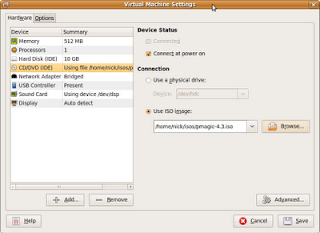
Step 2: Using VMware workstation, edit the settings for you virtual machine to now boot from the newly downloaded iso like this:
Step 3: Select the live CD boot option, or if you have set your VM with enough RAM you can select the RAM option:

Once the ISO has booted you will end up at a screen like this
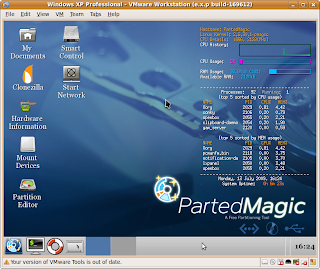
Step 3: Now click on the Partition Editor icon , and you will end up with a screen that looks like this.
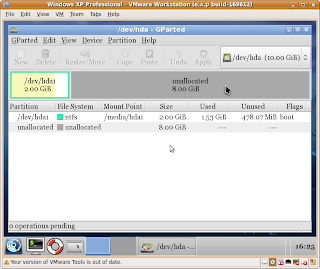
Click on the resize button, and select the whole of the disk, so this will grow the partition and filesystem to include the whole of your newly expanded disk. You can then watch the resizing process like this:
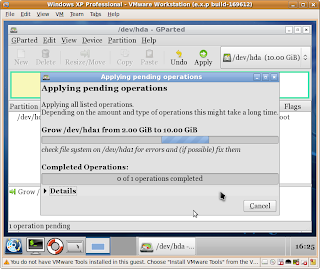
Once this has finished, you can re-boot your virtual machine, and you will have a nice new 10GB disk, where before it was a 2GB disk.
For this example, I'm using an old legacy XP virtual image that I'm currently using to test the beta versions of Firefox and chromium.
The step is to increase the size of the disk from the command line. The following command took the primary partion from 2GB to 10GB.
nick@nick:~/vm/Windows XP$ vmware-vdiskmanager -x 10GB "Windows XP Professional.vmdk"
Grow: 100% done.
Disk expansion completed successfully.
WARNING: If the virtual disk is partitioned, you must use a third-party
utility in the virtual machine to expand the size of the
partitions. For more information, see:
http://www.vmware.com/support/kb/enduser/std_adp.php?p_faqid=1647
Once you have increased the size of the virtual physical disk, we now need to increase the partition and the NTFS filesystem on that partition. You could rush out an waste £80 of your hard earned money on a product like Partition Magic, or you can follow my simple guide and do it for free.
Step 1: Download a copy of the linux partition and filesystem manipulation software Parted Magic, make sure you download the iso file. Afterwards I would recommend leaving a donation for the developers hard efforts.
Step 2: Using VMware workstation, edit the settings for you virtual machine to now boot from the newly downloaded iso like this:

Step 3: Select the live CD boot option, or if you have set your VM with enough RAM you can select the RAM option:
Once the ISO has booted you will end up at a screen like this

Step 3: Now click on the Partition Editor icon , and you will end up with a screen that looks like this.

Click on the resize button, and select the whole of the disk, so this will grow the partition and filesystem to include the whole of your newly expanded disk. You can then watch the resizing process like this:

Once this has finished, you can re-boot your virtual machine, and you will have a nice new 10GB disk, where before it was a 2GB disk.
Upgrade the Xen kernel on a Redhat Server
Now, if you server has a direct connection to the Internet , then this is very straight forward task, and just a matter of you leveraging the very good Redhat network bug fixing and patching tool. However, if you server has no access to the Internet, or a Satellite server, then how can I patch the kernel and tools? Well, it isn't that difficult, apart from one odd requirement.
Basically you need to log onto the RHN (Redhat network) and download the latest rpms for your version of installed RH. In my case I had version RHEL 5.2, and below is a list of the rpm's I used:
ecryptfs-utils-56-8.el5.x86_64.rpm
kernel-headers-2.6.18-128.1.16.el5.x86_64.rpm
kernel-xen-2.6.18-128.1.16.el5.x86_64.rpm
kernel-xen-devel-2.6.18-128.1.16.el5.x86_64.rpm
libvirt-0.3.3-14.el5_3.1.x86_64.rpm
libvirt-python-0.3.3-14.el5_3.1.x86_64.rpm
python-virtinst-0.300.2-12.el5.noarch.rpm
virt-manager-0.5.3-10.el5.x86_64.rpm
xen-3.0.3-88.el5.x86_64.rpm
xen-libs-3.0.3-88.el5.x86_64.rpm
The one odd rpm that I was not expecting to have to upgrade was the ecryptfs-utils, but the kernel wouldn't update unless it was updated first. It doesn't have any dependencies, so it was not a major problem.
Once you have installed these , with the rpm -Uvh command, you will need to reboot into the new kernel, as this level of Redhat doesn't offer the auto kernel updates yet.
This all went well, and allowed me to patch the secure virtual servers, that were having a problem with a memory leak in the previous kernel, and all has been well since.
It is work noting that when Redhat Enterprise Linux 5.4 gets launched in September, then there will be a major upgrade in the whole virtualization infrastructure , which will include using the KVM kernel modules. This will make this an even more compelling virtualization deployment platform.
I hope this saves you some time.
Basically you need to log onto the RHN (Redhat network) and download the latest rpms for your version of installed RH. In my case I had version RHEL 5.2, and below is a list of the rpm's I used:
ecryptfs-utils-56-8.el5.x86_64.rpm
kernel-headers-2.6.18-128.1.16.el5.x86_64.rpm
kernel-xen-2.6.18-128.1.16.el5.x86_64.rpm
kernel-xen-devel-2.6.18-128.1.16.el5.x86_64.rpm
libvirt-0.3.3-14.el5_3.1.x86_64.rpm
libvirt-python-0.3.3-14.el5_3.1.x86_64.rpm
python-virtinst-0.300.2-12.el5.noarch.rpm
virt-manager-0.5.3-10.el5.x86_64.rpm
xen-3.0.3-88.el5.x86_64.rpm
xen-libs-3.0.3-88.el5.x86_64.rpm
The one odd rpm that I was not expecting to have to upgrade was the ecryptfs-utils, but the kernel wouldn't update unless it was updated first. It doesn't have any dependencies, so it was not a major problem.
Once you have installed these , with the rpm -Uvh command, you will need to reboot into the new kernel, as this level of Redhat doesn't offer the auto kernel updates yet.
This all went well, and allowed me to patch the secure virtual servers, that were having a problem with a memory leak in the previous kernel, and all has been well since.
It is work noting that when Redhat Enterprise Linux 5.4 gets launched in September, then there will be a major upgrade in the whole virtualization infrastructure , which will include using the KVM kernel modules. This will make this an even more compelling virtualization deployment platform.
I hope this saves you some time.
Thursday, 9 July 2009
Playing with VMware workstation 7 beta
I have been using this on a Redhat 5.3 based workstation for several weeks now and it has proved in it's current build - 169612 to be very stable. I have run up several virtual images, which include a Redhat 5.2 image to test logical volume testing, and an Ubuntu 9.10 karmic image to have a look at how Grub v2 works with this next release. All have gone well, and there are many new features as you can see from the list below, which I have grabbed from the web.
The one point I would make , is if these are enough of an improvement on Workstation 6.52, as normally when Vmware ups the version number, they ask for some more money. We will have to wait and see for the announcement.
Anyway here is a list of what I have found on the new features.
* Improvements in the support of 3D
OpenGL 2.1 and Shader Model 3.0 are supported in virtual machines, Windows XP, Vista
and Windows 7.
* Support for new model drivers Windows Display Driver Model for Windows 7
is still only 2D acceleration and support only one monitor, the driver is using 32MB RAM.
If you want to run a 3d application in Windows 7, you must configure it to use the old SVGAII driver from VMware.
* Support vSphere 4.0 and ESX support
Professionals can now run these technologies as a guest system to verify the manner in which they are suited to your organization. ESX at this point is supported only on processors that support hardware-accelerated virtualization (all Intel Core 2 and above, AMD Athlon 64 X2 AM2/Phenom and above).
* Support for Multiple expanded to a four-SMP systems
VMware allows you to allocate to the guest system with four virtual single processor with two dual-and single-Quad.
* Virtual printer allows you to print without a printer to print on all printers host OS
Printers are added to the guest operating systems automatically and not require a network.
* Download VMware tools on the Internet on demand.
VMware added ability to upload via the internet the latest versions of VMware Tools including for the new OS, which will improve support for new systems of having to wait out a new version of VMware WorkStation.
* AutoProtect
Snapshot'ov possibility of creating a new virtual machine on a schedule for the rapid restoration of the guest OS.
* Encrypting the virtual machine
VMware now supports encryption (AES 128-bit) and password protection of virtual machines. Running such machines working in the VMware Player.
* Support for IPv6 was added to connect the type of bridge (direct connection of virtual machines to the physical network).
* Support for ALSA
Finally we became VMware support audio output to ALSA, which will simultaneously output sound from the host and guest OS without locking the sound device.
* Put on a break
Now you can temporarily stop the implementation of a guest operating system and free up resources for the system.
* Improvements in technology Drag and Drop.
Support drag and drop images, formatted e-mail attachments and zip folders is now supported in Windows, and Linux.
* Improved support for debugging of guest OSes in a replay ( "Play")
* Expanding virtual disks.
It is now possible to expand virtual disks and operating system Windows Vista and Windows 7 can take advantage of this opportunity without running additional software
* Fuse
Linux operating systems can now mount the virtual disk images via Fuse.
The one point I would make , is if these are enough of an improvement on Workstation 6.52, as normally when Vmware ups the version number, they ask for some more money. We will have to wait and see for the announcement.
Anyway here is a list of what I have found on the new features.
* Improvements in the support of 3D
OpenGL 2.1 and Shader Model 3.0 are supported in virtual machines, Windows XP, Vista
and Windows 7.
* Support for new model drivers Windows Display Driver Model for Windows 7
is still only 2D acceleration and support only one monitor, the driver is using 32MB RAM.
If you want to run a 3d application in Windows 7, you must configure it to use the old SVGAII driver from VMware.
* Support vSphere 4.0 and ESX support
Professionals can now run these technologies as a guest system to verify the manner in which they are suited to your organization. ESX at this point is supported only on processors that support hardware-accelerated virtualization (all Intel Core 2 and above, AMD Athlon 64 X2 AM2/Phenom and above).
* Support for Multiple expanded to a four-SMP systems
VMware allows you to allocate to the guest system with four virtual single processor with two dual-and single-Quad.
* Virtual printer allows you to print without a printer to print on all printers host OS
Printers are added to the guest operating systems automatically and not require a network.
* Download VMware tools on the Internet on demand.
VMware added ability to upload via the internet the latest versions of VMware Tools including for the new OS, which will improve support for new systems of having to wait out a new version of VMware WorkStation.
* AutoProtect
Snapshot'ov possibility of creating a new virtual machine on a schedule for the rapid restoration of the guest OS.
* Encrypting the virtual machine
VMware now supports encryption (AES 128-bit) and password protection of virtual machines. Running such machines working in the VMware Player.
* Support for IPv6 was added to connect the type of bridge (direct connection of virtual machines to the physical network).
* Support for ALSA
Finally we became VMware support audio output to ALSA, which will simultaneously output sound from the host and guest OS without locking the sound device.
* Put on a break
Now you can temporarily stop the implementation of a guest operating system and free up resources for the system.
* Improvements in technology Drag and Drop.
Support drag and drop images, formatted e-mail attachments and zip folders is now supported in Windows, and Linux.
* Improved support for debugging of guest OSes in a replay ( "Play")
* Expanding virtual disks.
It is now possible to expand virtual disks and operating system Windows Vista and Windows 7 can take advantage of this opportunity without running additional software
* Fuse
Linux operating systems can now mount the virtual disk images via Fuse.
Wednesday, 8 July 2009
Wow Google has announced it's Linux OS
Well it has been rumoured for twelve months now that Google was preparing a Linux based web centric operating system to unseat the behemoth that is Microsoft, well it has come to pass.
Read more here :BBC news on Google announcement
and the Google wiki here : Google announce Chrome OS
I can't wait to get my hands on the beta and give it a go.
Read more here :BBC news on Google announcement
and the Google wiki here : Google announce Chrome OS
I can't wait to get my hands on the beta and give it a go.
Subscribe to:
Posts (Atom)



 Posts
Posts


