
 I came across this problem while setting up Docker on my OSX environment , and after searching the web , I found a method that works well, and cures the problem.
Basically once the Virtualbox VM is created you need to edit the network adapter drivers and set them to "PCNET-FAST III" instead of the paravirtualised drivers. You need to do both adapters, and then restart boot2docker.
You will notice that you get the correct settings now in your /etc/resolv.conf file.
This was annoying me, and meant I had to reset the settings in the above file everytime I start docker - which is not ideal.
Hope this saves you some time.
Showing posts with label virtualbox. Show all posts
Showing posts with label virtualbox. Show all posts
Thursday, 11 June 2015
VM created by boot2docker init does not have DNS set up correctly - heres how to fix it
I came across this problem while setting up Docker on my OSX environment , and after searching the web , I found a method that works well, and cures the problem.
Basically once the Virtualbox VM is created you need to edit the network adapter drivers and set them to "PCNET-FAST III" instead of the paravirtualised drivers. You need to do both adapters, and then restart boot2docker.
You will notice that you get the correct settings now in your /etc/resolv.conf file.
This was annoying me, and meant I had to reset the settings in the above file everytime I start docker - which is not ideal.
Hope this saves you some time.


Wednesday, 15 August 2012
Using puppet with Virtualbox to speed up client additions install

One of the first things you need to do when you create a new VM is install the client additions code, which offers enhanced networking,screen sizing, cut & paste and general host/client integration. With Centos 6.3 Live CD installs , several of the needed rpm packages that allow the install are missing.
I have a puppet master installed and configured - which is beyond the scope of this post - but if you need help doing that, then just buy or download the Pro Puppet book, which covers this topic very clearly for any operating system.
Pro Puppet book
Make sure every machine can resolve all DNS entries properly , either with a DNS server or by hosts files - if you must. Every machine needs to resolve puppet.mynetwork.com and puppet.
You also need to install ruby , ruby-libs ,ruby-shadow , puppet and facter or you won't be able to connect to the puppet master in the first place. You can do this as part of your post-install kickstart or manually. You will also need to add the Fedora mainatained EPEL repo to get the latest versions of these.
The important elements that you need to install are make, gcc and kernel-devel and I also always add vim.
You need to define each of these in the modules sections under /etc/puppet/modules on the puppet master with their own directory structure of:
/etc/puppet/modules/make/files
/etc/puppet/modules/make/manifests
/etc/puppet/modules/make/templates
Within the manifests directory you need to add an init.pp, and for vim it will look like this:
class vim {
package { vim-enhanced:
ensure => present,
}
}
You can obviously do a lot more in these files, but this is just to show what is needed for this task.
You also need to make sure you include these modules in the node.pp file in the /etc/puppet/manifests directory. Like this:
node /^testmac\d+\.mynetwork\.com/ {
include vim
include make
include kernel-devel
include gcc
}
The guest server in my environment follows this naming scheme and the regular expressions allow you to have as many as you like.
To connect your new VM to the puppetmaster you can run the following command and make sure that the certificate is allowed on the server:
puppet agent --server=puppet.mynetwork.com --no-daemonize --verbose
Once the client server has the cert's installed correctly, then run this command again to auto install all the rpms needed for you to install the client additions. The client additions can be installed from the GUI or the command line, which ever you prefer.
You can now also manage all your VM's with puppet , and make your virtual dev/test environment a lot easier to manage.
Monday, 31 October 2011
Using the lightweight Fedora LXDE desktop for snappier Virtual machines

While having a look at Fedora 16 beta within Virtualbox virtualization software, I decided to use a more lightweight desktop environment.
Over the last couple of years as hardware has improved the desktop systems that sit on top of X windows have started to become more complex and powerful, but as a side effect have become resource intensive, which is not ideal for virtual machines.
There are many great different types of lightweight desktop environments, but one that is now supported by all the main distributions is LXDE.
Fedora 16 installation was a breeze - though I recommend upgrading Virtualbox to version 4.1.4 before you start for better support.
The lighter desktop has indeed made a massive improvement over speed and repsonsiveness to the Gnome 3 shell I installed on the Fedora 15 image I tested.
The menus and layout my be a little legacy for some, and perhaps for everyday use, but when most of the time is spent in a terminal widow, that is not the end of the world.
Here is a snap of the initial machine once installed.

There are many new features in this release of Fedora, including the latest 3.1 kernel, deltarpms with presto , the use of systemd instead of the now very old SysV daemon management & control and the use of specifically locked ethernet hardware to configuration definitions - so you see p2p1 instead of eth0 for instance.
The final release is only a few days aways, and for people who like cutting edge open source software Fedora is a good choice.
Give it a try and see what you think.
Wednesday, 10 November 2010
Is upgrading to the Intel i5 laptop processor worth the effort

In a word, yes . As you may have read on this blog a few weeks ago , I tried an experiment with using an SSD harddisk for the operating system in conjunction with an external 500GB hybrid disk for all the more volatile parts of the OS, like /var and /tmp.
This was a resounding successful with a marked ramp in performance across the whole operating system and applications, to the point now , that all other machines seem like sloth's in comparison.
I had a need to upgrade my work laptop recently, specifically for more CPU cores and access to that lastest hardware virtualization extensions. I use the laptop extensively for virtualization, so I picked the Dell Latitude E6410. This is a really good work horse, but more importantly it comes with the Intel i5 processor.
This has had a very positive affect on the whole systems performance when running virtual guests with VirtualBox - my current virtualization platform of choice - to the extent that I can now over commit on memory and cpu's , plus the density I can achieve on this box has literally doubled.
I always keep a system monitor going to see how hard the system us working, and while on the old E6400, with two virtual machines running , the system would be noticeable slower, now with four virtual guests running, there is still plenty of head room for the other applications I need to run.
If are about to upgrade, and you need the ability to run multiple virtual guests, then I would definitely recommend the extra spend on this processor. The more memory the better, but I'm happily working with 4GB currently, but I can take this up to 8GB if the need should arise.
Well done Dell this is a grand machine for running Linux.
Wednesday, 12 May 2010
Using Linux kernel KVM and Virtualbox virtualization on one machine with Ubuntu
As I like to use many forms of virtualization to check out new features and tricks, as they are all different, then you can hit problems with the different kernel modules that get loaded at boot time. To solve this problem I have written this simple script to unload the Linux KVM modules when I wish to use Virtualbox, and then allow me to simply load them when I want to use KVM instead.
It also allows me to check if the modules are loaded, and uses a nice graphic password prompt as you have to execute this as a root user.
During testing I have found that loading the KVM modules while you have Virtualbox running is not the best of ideas, not surprisingly ;-)
Here is the script - I have had to split it up into two screen shots, otherwise I lose the formatting, which makes it harder to read.


It also allows me to check if the modules are loaded, and uses a nice graphic password prompt as you have to execute this as a root user.
During testing I have found that loading the KVM modules while you have Virtualbox running is not the best of ideas, not surprisingly ;-)
Here is the script - I have had to split it up into two screen shots, otherwise I lose the formatting, which makes it harder to read.


Thursday, 29 April 2010
Upgrading my Dell laptop to Ubuntu 10.04 couldn't have been easier
After many successful test's with virtual machine upgrades from 9.10 to 10.04, I decided it was time to try it for real on my work laptop.
I made a few steps before I started the upgrade:
1) Made sure I had plenty of disk space for the new OS downloads
2) Made sure the machine was fully patched and upto date
3) Got ride of the old downloaded patch files by running this command at the command line
apt-get clean
4) Turned off all third party application repositories in "Software Sources". I turned them back on after the upgrade, making sure they now point to the new lucid area.
5) Stopped all applications , apart from Chromium , as I wanted to browse while the machine was busy.
Once all that was done, I just ran update-manager -d and let it do it's stuff. There were a couple of questions on the way, which I just selected the defaults and pressed "Forward/Next"
After about an hour , the Dell Inspiron 6400 was ready to reboot, which is what I did.
The first reboot took a little longer as it moved things into the correct position, and then there I was at the login screen. This is with my two monitor configuration working perfectly.
I have since re-enabled my third party repositories and done an update, and this post is coming from that machine.
I'm really liking Gwibber, I had it installed before, but it is better integrated with the whole OS now.
I would definitely give it a go before the mirrors get red hot with millions of your fellow Linux users trying to do the same.
I made a few steps before I started the upgrade:
1) Made sure I had plenty of disk space for the new OS downloads
2) Made sure the machine was fully patched and upto date
3) Got ride of the old downloaded patch files by running this command at the command line
apt-get clean
4) Turned off all third party application repositories in "Software Sources". I turned them back on after the upgrade, making sure they now point to the new lucid area.
5) Stopped all applications , apart from Chromium , as I wanted to browse while the machine was busy.
Once all that was done, I just ran update-manager -d and let it do it's stuff. There were a couple of questions on the way, which I just selected the defaults and pressed "Forward/Next"
After about an hour , the Dell Inspiron 6400 was ready to reboot, which is what I did.
The first reboot took a little longer as it moved things into the correct position, and then there I was at the login screen. This is with my two monitor configuration working perfectly.
I have since re-enabled my third party repositories and done an update, and this post is coming from that machine.
I'm really liking Gwibber, I had it installed before, but it is better integrated with the whole OS now.
I would definitely give it a go before the mirrors get red hot with millions of your fellow Linux users trying to do the same.
Tuesday, 27 April 2010
Upgrading Ubuntu 9.10 to Ubuntu 10.04 in a virtual machine
As you will know the next major long term release of Ubuntu is about to ship in 3 days time so I thought I would do a test upgrade to make sure all was working well and there were no real show stoppers. This is a controlled environment, so won't be exactly the same as a machine that has been in use for a while, but is none the less a good initial test. If it doesn't work here, then it is definitely not going to work on a machine that has been in use for a while.
So, I installed a 9.10 i386 desktop virtual machine , using Virtualbox 3.1.6 on an Ubuntu 9.10 host. See the pictures below. This has had the Virtualbox tools installed.

I then ran a complete update on the virtual machine to make sure the machine had the latest packages before starting the upgrade.
I then ran


Once the process had completed, which took just over an hour with a very fast internet connection, I was able to selct to remove the now obsolete packages and complete the install.


I then re-installed the Virtualbox tools, as we now have a new kernel and the system was up and running without any issues and the Virtualbox tools were working as expected, see below.

So this does leave a really good feeling for all of my machine upgrades that will be taking place after the release of the final version on Thursday.
If you are new to operating system upgrades, then I can't recommend this process enough for making sure you are confident before doing it on your work machine.
So, I installed a 9.10 i386 desktop virtual machine , using Virtualbox 3.1.6 on an Ubuntu 9.10 host. See the pictures below. This has had the Virtualbox tools installed.

I then ran a complete update on the virtual machine to make sure the machine had the latest packages before starting the upgrade.
I then ran
update-manager -dto start the upgrade process.


Once the process had completed, which took just over an hour with a very fast internet connection, I was able to selct to remove the now obsolete packages and complete the install.


I then re-installed the Virtualbox tools, as we now have a new kernel and the system was up and running without any issues and the Virtualbox tools were working as expected, see below.

So this does leave a really good feeling for all of my machine upgrades that will be taking place after the release of the final version on Thursday.
If you are new to operating system upgrades, then I can't recommend this process enough for making sure you are confident before doing it on your work machine.
Thursday, 1 April 2010
An Ubuntu 10.04 virtual machine with Virtualbox on Ubuntu 9.10
As I'm sure most of you do, I don't just jump to the latest versions of operating systems until I have had a good look at it before hand in a virtual machine. It doesn't completely guarantee that you wont have any problems with a bare metal installation, but it will give you a good understanding before you start.
The latest version of Virtualbox for Linux - 3.1.6 r59338 - arrived two days ago and the new virtual machine guest tools make it significantly more usable. The picture below shows that version.

This enables more fine grained testing of the Ubuntu 10.04 release with much better graphics and enhanced performance, all of which are gratefully received.
I would recommend downloaded this combination and having a look at the latest offering that is about to be delivered by the Ubuntu community as it's going to be a good one.
Ubuntu 10.04 beta
Virtualbox
The latest version of Virtualbox for Linux - 3.1.6 r59338 - arrived two days ago and the new virtual machine guest tools make it significantly more usable. The picture below shows that version.

This enables more fine grained testing of the Ubuntu 10.04 release with much better graphics and enhanced performance, all of which are gratefully received.
I would recommend downloaded this combination and having a look at the latest offering that is about to be delivered by the Ubuntu community as it's going to be a good one.
Ubuntu 10.04 beta
Virtualbox
Monday, 15 March 2010
Some issues while Checking Ubuntu Lucid 10.04 Alpha 3 in Virtualbox
I have been keeping up with the latest development builds of what will become Ubuntu 10.04 and all has been going reasonably well until the latest kernel install today. It appears that some of the code has been pack-ported from the latest upstream kernel - 2.6.33 - to the latest kernel in lucid - 2.6.32-16 - and it is causing an issue with Virtualbox.
After checking the forums, there is a kernel patch to fix this - see here
Basically, you need to edit this file -
This code is installed with the Virtualbox tools that you must install before this file will be appear on the hard disk.
See the picture below:

Once you have edited this file and saved it , run the following command
This will stop the problems with kernel crashes and the graphics not working correctly.
If you are also having problems with the mouse disappearing, then you need to turn off the visual affects in
Menu -> System -> Preferences -> Appearance
Set it to none, and the mouse will come back to life.
This is shaping up to be a great release, and once a few rough edges have been removed it will be an extremely useful addition to the ubuntu family.
After checking the forums, there is a kernel patch to fix this - see here
Basically, you need to edit this file -
/usr/src/vboxvideo-3.1.4/vboxvideo_drm.c
This code is installed with the Virtualbox tools that you must install before this file will be appear on the hard disk.
See the picture below:

Once you have edited this file and saved it , run the following command
sudo /etc/init.d/vboxadd setup
This will stop the problems with kernel crashes and the graphics not working correctly.
If you are also having problems with the mouse disappearing, then you need to turn off the visual affects in
Menu -> System -> Preferences -> Appearance
Set it to none, and the mouse will come back to life.
This is shaping up to be a great release, and once a few rough edges have been removed it will be an extremely useful addition to the ubuntu family.
Monday, 18 January 2010
Ubuntu 10.04 alpha 2 installs more quickly into virtualbox VM

After installing the alpha 1 version of the next release of Ubuntu, which did take a long time, the latest release , alpha 2 is as smooth as silk, and considerably quicker. The actual installation process is much the same as 9.10, and in fact most of the screens still show 9.10 as the version ;-)
After an initial quick look around the only major difference I can find is the introduction of the new video editing software - Pitivi - by default, but gimp is still present even though it has been rumoured that is was to replace it.
See below:

One nice feature, is that with this version the Virtualbox tools are auto-detected when you click to install them, and Ubuntu auto-installs them once you have given the correct password. This is a very neat touch and brings Ubuntu fully in-line with the sort of auto-magical installs that happens with Mac OSX and Windows.
The other noticeable new feature is speed, this virtual machine boots to the login prompt incredibly quickly, and as the development cycle continues I can only see this getting faster, it will be a feature. The standard use of Ext4 and the reduction in daemons started at initial boot is bound to impact this.
Saturday, 24 October 2009
Cloud storage helps data access across local virtual machines
Another fantastic use for cloud based file storeage is to keep the information in sync between your main machine and all your virtual machines on that host. I have to keep a lot of documents around for the various projects I'm currently working on , and having to duplicate those across several virtual machines would be a complete pain in the backside. So the easy and simple way around this, while also making sure that they are constantly backed up, is to open either an Ubuntu one or Dropbox cloud account , and save your documents there.
I know several people may well advice you that you data isn't safe, or could be looked at by the company staff running the systems, but having read the security documents of these companies, and knowing the reliability of local storage, I believe the potential for undeisred access to your data is far out weighed by the massive advantages you get on the other side, of which this use is but one.
Once the documents are saved into the Ubuntu One or Dropbox folder, you can then share that folder with any virtual machine on your host as this folder is constantly available to you, even while off-line, which is great for working on the move.
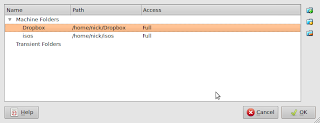
I'm currently running the 64bit version of Virtualbox on my Dell XPS laptop, with Ubuntu 9.10 , and using the Dropbox and Ubuntu One cloud areas for my data. I then simple share these using the shared folder utility - see below - and can access my documents easily and securely from any of my many virtual machines which include:
Windows XP
Redhat Enterprise server - several
Fedora 11
Ubuntu 9.10 server - several
Windows 7 - toy, of no practical use
I also have to comment that I'm using Virtualbox considerably more these days on the laptop as it is just faster than VMware workstation and it's open source and free. I still keep VMware around for those virtual machines that need it, but all my new machines are now built with Virtualbox. I do fully expect VMware workstation to at some stage to be made free, as trying to compete with Virtualbox with just VMware player is not going to work as a strategy. VMware has all the other technologies knocked into a cocked hat when it comes to the server management and deployment, but the workstation has moved on.
I know several people may well advice you that you data isn't safe, or could be looked at by the company staff running the systems, but having read the security documents of these companies, and knowing the reliability of local storage, I believe the potential for undeisred access to your data is far out weighed by the massive advantages you get on the other side, of which this use is but one.
Once the documents are saved into the Ubuntu One or Dropbox folder, you can then share that folder with any virtual machine on your host as this folder is constantly available to you, even while off-line, which is great for working on the move.
I'm currently running the 64bit version of Virtualbox on my Dell XPS laptop, with Ubuntu 9.10 , and using the Dropbox and Ubuntu One cloud areas for my data. I then simple share these using the shared folder utility - see below - and can access my documents easily and securely from any of my many virtual machines which include:
Windows XP
Redhat Enterprise server - several
Fedora 11
Ubuntu 9.10 server - several
Windows 7 - toy, of no practical use

I also have to comment that I'm using Virtualbox considerably more these days on the laptop as it is just faster than VMware workstation and it's open source and free. I still keep VMware around for those virtual machines that need it, but all my new machines are now built with Virtualbox. I do fully expect VMware workstation to at some stage to be made free, as trying to compete with Virtualbox with just VMware player is not going to work as a strategy. VMware has all the other technologies knocked into a cocked hat when it comes to the server management and deployment, but the workstation has moved on.
Friday, 18 September 2009
Installing your Virtualbox drivers in the Ubuntu 9.10 alpha 6

While playing with Ubuntu 9.10 Alpha 6 in a newly created virtual machine, I noticed that the normally easy install of the kernel drivers , well wasn't easy at all.
Basically with the version of virtua l box that I use - 3-0-3.6, the virtual drivers CD didn't appear on the desktop as normal. The iso file did appear on the config page, so virtualbox new that it had changed.
All you have to do is to mount the drive that is indicated on the bottom panel, which for my Dell M1330 , within the virtual machine was /dev/sr0.
Once this was mounted , the usual drivers could be downloaded and installed as normal, and the testing could commence.
Hope this saves you some time from hunting around to find out why the image doesn't auto mount.
Monday, 14 September 2009
Latest VMware workstation release works well with Ubuntu 2.6.31 kernel

I recently upgraded the kernel on my notebook to play with the kernel mode setting to speed up the graphics with the Intel graphics card, which it did admirably, so I would be loathed to go back to an earlier kernel.
VMware and the latest kernels haven't always got along nicely , but on this occasion it was simply a matter of attempting to start VMware player, it detected a new kernel, and compiled the drivers for me, can't get much easier than that.
It then allowed me to start my old VMware images without a hitch.
Here is a screenshot of what it did:

The version for Linux has come a long way since it's early days, and it really is very simple to use now for even the most new learners of the platform.
The only problem that I'm currently having with this version of workstation is the resume from suspend ,which is extremely slow, but this could be down to the debug code in the installation. VirtualBox truly puts it to shame on the same hardware currently, but only a true comparison can be once it is released.
Friday, 14 August 2009
Getting Ubuntu 9.10 running in Virtualbox
After downloading the latest iso this morning I decided to get it installed into a virtual machine and take a look.
Here are a couple of screen shots:
The first shows installing it into the virtual machine using the iso. I used 256 meg of Ram, a 4GB harddisk and bridged ethernet via my wireless card.

Once it was installed , I then installed the client tools from VirtualBox into the virtual machine.

Finally I installed the latest build of the Chromium browser into the virtual machine to test how that runs in the latest build. Instructions on how to get Chromium installed easily in Ubuntu look here on my blog.

It is running fine, and as it is using ext4 it is quick, even as a virtual image, and chromium also flies along to make the experience very pleasurable.
Here are a couple of screen shots:
The first shows installing it into the virtual machine using the iso. I used 256 meg of Ram, a 4GB harddisk and bridged ethernet via my wireless card.

Once it was installed , I then installed the client tools from VirtualBox into the virtual machine.

Finally I installed the latest build of the Chromium browser into the virtual machine to test how that runs in the latest build. Instructions on how to get Chromium installed easily in Ubuntu look here on my blog.

It is running fine, and as it is using ext4 it is quick, even as a virtual image, and chromium also flies along to make the experience very pleasurable.
Wednesday, 5 August 2009
Virtualbox has been updated to version 3.0.4
I noticed this morning with the updates to my Ubuntu desktop that virtual box has been updated to version 3.0.4, which in the change logs is a maintenance release.
You can see the bug fixes here Virtual Box 3.0.4 changelog
Here are the Linux specific changes:
Linux hosts: fixed problems leading to wrong colors or transparency in host windows with some graphics drivers (bug #3095)
Linux hosts: hardware detection fallbacks if the hal service fails to find any DVD drives.
Linux and Solaris hosts: Work around color handling problems in Qt (bug #4353)
There are several other X and openGL fixes , which may or may not affect you.
You can see the bug fixes here Virtual Box 3.0.4 changelog
Here are the Linux specific changes:
Linux hosts: fixed problems leading to wrong colors or transparency in host windows with some graphics drivers (bug #3095)
Linux hosts: hardware detection fallbacks if the hal service fails to find any DVD drives.
Linux and Solaris hosts: Work around color handling problems in Qt (bug #4353)
There are several other X and openGL fixes , which may or may not affect you.
Wednesday, 15 July 2009
I'm very impressed with VirtualBox 3.0.2

I have been using VMware workstation since before version one, and it has always served me well up until now. I have started to read lots of good articles on how good Sun Microsystems latest release of Virtualbox has become, so I decided to download it and give it a whirl. Well I can also add my thumbs up to version 3, as this product has moved on extensively since I last tried it.
The migration of some of my older VMware virtual machines was painless, and building a new Windows 7 virtual image was fast and every bit as painless as using VMware Workstation 7 beta.
The suspend and resume is much faster with this version than the latest VMware release, though VMware does have debug mode switched on which might account for some of that. I also really like the seamless mode, which allows you to show just the start bar from Windows and the currently running apps. This works very efficiently, and again I prefer it to the Unity mode in VMware.
Another enormous benefit is that it is free, in both price and spirit, VMware workstation is $200, and the development community behind the project are working towards interoperability with other virtualization methods with makes your virtual images more portable and flexible.
Well, I certainly won't be dropping my VMware just yet, but I'm using this new release more and more, and if it continues to impress, then I suspect it will become my preferred desktop virtualization product.
Get it here Virtual Box
Wednesday, 13 May 2009
What on earth is all this fuss about Windows 7
I have just download and installed into a VMware virtual machine the RC version 7100 of windows 7. The funny thing is that VMware thought it was Vista, and selected all it's default settings as if it was.
Now I only keep a virtual machine copy of windows around for legacy apps, so it doesn't play much of a role in my IT life, but I would like it to be as fast as possible and to work with VMware as seamlessly as it possibly can.
I have to say , having tried Vista in a virtual machine, and deleting it within hours of it's install due to it being completely unusable, I didn't hold out much hope for Windows 7. In it's defence it certainly runs significantly faster than Vista with the same amount of virtual resources: 1GB RAM, 16GB Disk, 1 processor.
My problem is though, it looks just like Vista, and with a default install appears to offer nothing over my XP SP3 virtual machine. Now I have only just installed it, and I may find some killer feature down the line, but after 2 days of having a good look around it , my opinion would be that it's on the surface XP with a new theme. Now hopefully there has been a lot of good coding underneath to make it more secure, and I have noticed it has copied Linux in that it now requires a positive affirmation before it installs new apps, which is good.
I will keep it on my machine and do some more testing, and I'm going to install it onto a USB key so I can test it on my Asus 1000 netbook if it will install on a flash drive. I certainly won't be buying a copy as XP does exverything I need for a very rarely used legacy app support system, by I was expecting an awful lot more from this OS considering the hyperbole that has been flying around the blogosphere and the web.
This product would certainly never offer a platform that would make me switch from Linux as my default platform, as you get so many apps straight out of the iso, why would I want to waste hundreds of pounds on software , and spend time installing it.
The biggest problem for any IT literate person is the amount of time you are going to have to spend installing apps just to make it vaguely useful: Chrome, Firefox, Anti-virus, Openoffice etc etc etc - just name your favourite app. here. No, this in my opinion is definitely nothing to get excited about.
The virtualization offering is also a complete mess with this release. What other OS requires you to download a completely separate product , once you have downloaded and installed the OS? Then it will only install on specific versions, and it will only offer support for another Microsoft OS? Great for large companies, but naff all use to anyone else. You would be much better of installing Virtual box or Vmware workstation and getting the real deal, or better still, just installing Linux and have it all built in from the start. This is complete nonsense from Microsoft, they should have built a proper hypervisor in from the ground up, and is yet more proof this is nothing more than Vista II.
Now I only keep a virtual machine copy of windows around for legacy apps, so it doesn't play much of a role in my IT life, but I would like it to be as fast as possible and to work with VMware as seamlessly as it possibly can.
I have to say , having tried Vista in a virtual machine, and deleting it within hours of it's install due to it being completely unusable, I didn't hold out much hope for Windows 7. In it's defence it certainly runs significantly faster than Vista with the same amount of virtual resources: 1GB RAM, 16GB Disk, 1 processor.
My problem is though, it looks just like Vista, and with a default install appears to offer nothing over my XP SP3 virtual machine. Now I have only just installed it, and I may find some killer feature down the line, but after 2 days of having a good look around it , my opinion would be that it's on the surface XP with a new theme. Now hopefully there has been a lot of good coding underneath to make it more secure, and I have noticed it has copied Linux in that it now requires a positive affirmation before it installs new apps, which is good.
I will keep it on my machine and do some more testing, and I'm going to install it onto a USB key so I can test it on my Asus 1000 netbook if it will install on a flash drive. I certainly won't be buying a copy as XP does exverything I need for a very rarely used legacy app support system, by I was expecting an awful lot more from this OS considering the hyperbole that has been flying around the blogosphere and the web.
This product would certainly never offer a platform that would make me switch from Linux as my default platform, as you get so many apps straight out of the iso, why would I want to waste hundreds of pounds on software , and spend time installing it.
The biggest problem for any IT literate person is the amount of time you are going to have to spend installing apps just to make it vaguely useful: Chrome, Firefox, Anti-virus, Openoffice etc etc etc - just name your favourite app. here. No, this in my opinion is definitely nothing to get excited about.
The virtualization offering is also a complete mess with this release. What other OS requires you to download a completely separate product , once you have downloaded and installed the OS? Then it will only install on specific versions, and it will only offer support for another Microsoft OS? Great for large companies, but naff all use to anyone else. You would be much better of installing Virtual box or Vmware workstation and getting the real deal, or better still, just installing Linux and have it all built in from the start. This is complete nonsense from Microsoft, they should have built a proper hypervisor in from the ground up, and is yet more proof this is nothing more than Vista II.
Subscribe to:
Posts (Atom)



 Posts


