Smoothwall Firewall project

Showing posts with label Google Chrome. Show all posts

Thursday, 11 November 2010

Speeding up your Linux browser using a ramdisk


I came across an interesting article yesterday, about someone who had speeded up their browser on Windows by using a ramdisk, and knowing that Linux can happily do this, I decided to write down how to do this for the Linux user.

Firstly we need to create a directory that we can use for the ramdisk, and get it to automatically mount everytime we start our machine.

1) create the directoty - sudo mkdir /var/ramdisk
2) then edit this file and add the following line at the end - gksudo gedit /etc/fstab
/var/ramdisk /var/ramdisk tmpfs size=512m 0 0
3) Now mount this new ramdisk to test
sudo mount /var/ramdisk

We now have our ramdisk, and we can add this to the start options for Chromium and Firefox.

Firstly we will do Chrome as it's the easiest, simple add the following line to the startup options/icon that your use to start Chrome.

--disk-cache-dir=/var/ramdisk

See below:
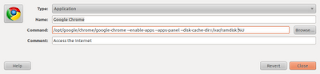

If you now click on Chrome, you will now be using a Ram disk, and you can look at what you are storing in that cache, but looking in the directory you created earlier.

Now, for firefox we use a different method,

Mozilla Firefox

  • Type about:config into the address bar, accept the warning ("I'll be careful, I promise!")
  • Right click > New > String
  • Type browser.cache.disk.parent_directory into the box and press OK
  • Type the path of your BrowserCache directory -- /var/ramdisk press OK
  • Close all open Firefox tabs and windows
  • Open the browser again
(Part of the above section was lifted directly from this web page to save typing - http://goo.gl/RKr7z)

That's it, you now have you cache being stored in RAM instead of on disk, which is significantly faster, for saving and reading cached pages. I have started with a RAM disk of 512m, which may be too large for you or too small, but you can adjust that once you see what your usage profile is like.

Thursday, 22 July 2010

Is Ubuntu thinking about switching to Chromium in 10.10?


While testing with the latest daily build I thought I would look through the App store to see if Google was in there, and instead I found a Chromium version (fully open source) version which is pinned to the exact same release code as the stable release of Google Chrome.

Now I get why in the base installation they don't want the Google Chrome release, but the Chromium version has up until now always been bleeding edge. So by taking the same stable version and just building the open source bits make it very easy to now include this.

As it stands today, you get FF 3.6, and it is very unlikely that FF 4.0 will be ready in the development timeframe for Ubuntu 10.10, but Chromium is ready now, and offers a much faster experience than FF. Now, version 5 of Chrome/Chromium is not perfect, but for 99% of peoples surfing needs it works fine.

Now, this is me finding something in repositories and making 5 from 2 + 2, but it really wouldn't take that much of a step, and it would be a real differentiator between the distro's. They must be thinking about it, otherwise why go to all this problem.

Have a look yourself and see what you think.

Saturday, 17 July 2010

Setting Chromium to use the search engine of your choice

Chromium, like all good browsers is very flexible and allows you change things around, which is good, as one of it's default features can be very annoying. The feature , is that it auto detects which country you are in , and when you do a search it returns the information in the language of that country. This is great if you want that, but can be a real pain in the backside if you don't. As I travel between France and the UK very regularly, I need to be able to have the search engine, where ever I am, and this little trick sorts that out for you.

Well there is a easy way to fix that.

1) Go to the wrend menu and select options
2) Then click on manage search engines
3) Click on add to create a new one
4) Make it look like the picture below - substitue your country as appropriate.
5) Make it one of the defaults
6) Now test it with a search in the omnibar for something


The other great part of this is you can also set up other custom search engines for all your favourite sites , and I have set one up for the Linux Man pages , which I found on another site.

So if I now want to look up the man page for a command, I just type man command in the omnibox, and it takes me straight there.

See this picture on how I did that one.

Thursday, 8 July 2010

Google web apps appear on the latest Chromium builds


I have been following the development of the ChromiumOS, and one the things I liked was the way that my often used apps would appear on a menu page and be easy to load. There is nothing revolutionary about at present, apart from it's convenience and the potential of what Google has up it's sleeve for the next generation of browser based web apps.

Well, you don't have to wait for the release of ChromiumOS anymore as you can have a play with them now, thanks to these articles

Download Squad

Google Chromium blog

Basically you need to add a start up option to your Chromium start button/icon which is --enable-apps. Once this is down, download the crx files from the second link onto your harddrive, and then just drag and drop them onto Chromium. If you know press Ctrl-t , you will see the web apps displayed. Click on one and it will appear on the left of the browser.

Now, if like me you follow the PPA chromium development build, then you will find that the web apps mentioned - gmail etc - in the first article are not in place in /usr/lib/chromium/resources, so use the ones from the second article instead.

If you look at my picture above you will see the web apps on the far left of the browser screen.

There is also some interesting discussions happening on the web about what these offer over a normal extension, apart from the pretty icon above the tab, I think currently , this is showing what will be available , and how it is going to progress rather than astounding us now.

Thursday, 3 June 2010

Google chrome stable is released for Linux and Mac


Well, I have been working with the beta version of chrome and the developer version of chromium since they were released and have seen them grow into great browsers that deserve their place amongst the best on the web.

So it was a momentous day when we got a full release version on the Linux - and Mac - platforms that will now be compared to other stable versions available for these platforms , like Firefox and Safari.

There are no particular new features in this release, as the last beta had most of the news, but this is just to give a base line from which to build.

They have mentioned that when Adobe launch their flash player in a few weeks - version 10.1 - then this will be built into the browser, which is great for us , but could be a major problem for Apple and Microsoft.

You’ll be able to synchronize not only bookmarks across multiple computers, but also browser preferences -- including themes, homepage and startup settings, web content settings, preferred languages, and even page zoom settings. Meanwhile, for avid extensions users, you can enable each extension to work in incognito mode through the extensions manager.

The stable release also incorporates HTML5 features such as Geolocation APIs, App Cache, web sockets, and file drag-and-drop. For a taste of HTML5’s powerful features, try browsing through websites developed in HTML5 such as scribd.com, dragging and dropping attachments in Gmail, or by enabling the geolocation functionality in Google Maps. We’ve also given Chrome’s bookmark manager a facelift with HTML5.

I have been testing this Browser on my Ubuntu 10.04 laptops in both 32 and 64 bit versions and found it to be fast, stable and reliable. I do use Chromium on a day to day basis as I like to help debug the future of the browser, but will turn to Chrome for it's stability when I need to book flights or do my on-line banking.

I can recommend you give it a go and just see the speed difference you will experience.

Download it here Get Google Chrome Stable

Saturday, 3 April 2010

New browser usage stats on W3counter show a huge rise in Linux and Chrome

I like to keep an eye on what the internet statistic people produce on a monthly basis, so that when people try telling me that internet explorer still has 90% of the browser market, and Linux usage is less than 1% I can point them at some facts.

Well the stats are just in from the W3counter web site and they make for interesting reading on both counts.

Google Chrome/Chromium continues to take junks out of internet explorer usage, and most interestingly not at the expense of Firefox, which I find interesting. You see a lot of the people I know in the Linux community have switched to using Chromium, so it would indicate to me that Firefox is also continuing to take usage away from Microsoft.

Also very interesting reading was the large increase in the number of people who are know surfing the web using Linux between February and March. This amounts to not far off a 100% increase. This figure is bound to increase during this years, with the massive increase of people starting to use Android on their Tablets and phones etc.

Anyway, have a look for yourself, and make of them what you will. Statistics never tell the whole story, and this one set certainly will not tell us the real situation, but the trends are more significant, and there are some things like the decline of internet explorer which appears to be gathering pace. This could be explained by the European Union standing up to the monopolistic Behemoth and getting the browser option presented to every user. Why the Americans and the rest of the world is not offered this is quite beyond me.

W3counter stats

Wednesday, 17 February 2010

Chrome shoots to number 2 in my blog viewing figures.

My Blogs visitor browser stats
Now, we must get the caveats out of the way first:
1) I know my blog is Linux/open source oriented
2) This is a very small sample set and number of users
3) I'm sure absolutely positive that other sites could have their views slued depending on the subject matter.

However, I have been using Google Analytics to keep an eye on my blog since I started it, and without fail the order of browsers visiting my site has always been Firefox first and Microsoft Internet explorer second, but not anymore. Google Chrome has moved into second place by some margin as you can see above.

In the grand scheme of the computing universe this is probably not that significant, but I have definitely seen a shift in the visitors browsers who come to this blog, which in combination with other statistics flying around the web does show a shift in peoples attitude to switching their browser.

Friday, 25 December 2009

Google Chrome Extensions: Blog This! (by Google)

Google Chrome Extensions: Blog This! (by Google)

I know the Google community have been working hard on many new features for the browser, and in particular is an attempt to emulate the success of Firefox with their extensions.

Well here is one extension that I find is particularly useful, and will keep an eye on it's development over the coming months, as it is still missing a couple of key components like tagging and adding pictures, but I'm sure that this will come shortly.

Even in it's current form it is useful, and it allows you to blog on something that you stumble across on the web.

There are now many useful extensions in the Google repository , not anywhere near as many as in the Firefox library, but already significantly more than other popular browsers.

I also use the book mark syncing utility that is built into Chromium rather than the Linux Beta Chrome, and combined with the extensions you have a very powerful browser and feature complete browser.

Hope you find this extension useful.

Monday, 21 December 2009

The Christmas Elves have been busy over at Mozilla towers


I think one of the really bright spots for Linux in 2009 has been the increase in quality browsers for the platform, and at the turn of the year the pace of change and development doesn't appear to have slowed one bit.

We have just had the Beta version of Google Chrome release to the world, and packages are already available for many distributions.

Now Mozilla have not been standing still, and their next release 3.6 has just had a new beta released, and with it the ability to easily integrate the Mozilla personas, basically themes for your browser. Mozilla Personas

I also stumbled across a post on the latest and greatest new features that are going into version 3.7, and one of those, has been in Chromium from the start, and that is tab process separation, which means if one tab freezes the browser won't.

You can only do this with version 3.7, and this how you do it:

type about:config

and then type

dom.ipc.plugins.enabled

and make sure it is set to true.

It works, and I'm playing with it now, so time will tell how stable it is. The smart move from the Mozilla guys, was to use a lot of the code from the Chromium project, so not re-inventing the wheel, wize move.

I'm looking forward to the renewed competition in the new year, as the main beneficiaries are the linux browser community.

Thursday, 10 December 2009

Google chrome is released as a beta on Linux and Mac and it is good

As you will have read I have been following the builds of Chromium since they were first released, and have worked with the alpha code and helped find the odd bug or two. The one key thing to note is that yes there have been some bugs, what alpha doesn't have them, but a lot less that you would expect. I have used alpha versions of other products which are basically completely unusable. Chromium has been usable since the first release.

I suppose not surprisingly some of the biggest issues that have faced the development team have been the integration of the plugins we all use and the fact on Linux alone we have two main desktop GUI infrastructures. I'm writing this post from the latest daily build of Chromium, and although this is the development version, it is working perfectly.

The Chrome beta build doesn't currently support bookmark syncing, which is why I'm sticking with Chromium, however with xmarks now in the extensions library this is really not a big issue for many users. It may also be worth looking at xmarks if you use Firefox and Chrome on multiple platforms as your life will get a lot easier.The key point is that Chrome now has it's own extensions library and this is only going to exploded as new services are added.

The Google chrome beta is stable and extremely fast, as it has always been. The only major issue that I'm really aware of on the Linux platform is the lack of ability to automagically launch pdf files when you hit them on the web. The flash and other plugins work fine on my Ubuntu desktops, both 32 and 64 bit versions.

This is yet another step on the road to a full release of Chrome for Linux and of course a lot of this work will filter into the ChromeOS that will launch on new hardware next year. I can't wait to get my hands of one of the new machines, as I think for ultra potable devices they are going to be extremely useful.

Anyway, the installation information is there for Debian/Ubuntu/Fedora and Suse so there is no excuse not to have a play and see what all the fuss is about.

Chromium Beta on Linux

Wednesday, 18 November 2009

Extensions coming soon to Chromium on Linux so they are now telling us

The screen shot below says it all.

Extensions library

The launch of this may be timed with the big announcements coming tomorrow from the Googleplex or maybe it is completely unconnected, but all will be revealed tomorrow no doubt.

Monday, 16 November 2009

Google community looks ready to launch a new extensions site

With the latest builds of Chromium on Linux there is a new link that has appeared which is similar to the curtain for the themes that are now available.

At the moment it takes you to a Google search screen, but it is obviously limbering up to offer a whole new site full of Chrome extensions. To be fair, Firefox is not going to have to worry too much for the immediate future as they already have thousands of excellent extensions, and it will literally take years to get to that level.

Here is the link.

Bookmark syncing arrives for Google Chromium on Linux

I have long talked about the advantages of Mozilla Weave and how you can securely keep you browsing information in a cloud based repository so that it can move with you where ever you decide to do your browsing. This is extremely useful and saves having lots of different bookmarks on different computers.

Well the ability has now arrived for Chromium, and it is built into the browser rather than an add-on like Weave. To enable it you need to call the browser with the

--enable-sync

setting, and it will appear in the wrench menu, see below.

Chromium sync options

The Chromium version works in a completely different manner to Weave in that once you have authenticated your Google account information your bookmarks are stored in your Google docs area as a folder. This does have the advantage that you can easily share your bookmarks with friends and family if you wanted.

This facility doesn't offer the full range of choices that the Mozilla Weave does, but it is the first iteration and I'm sure this will be developed further.

You can check the status of your synchronisation in the options menu, again see below.

Friday, 30 October 2009

Well Ubuntu 9.10 has officially arrived and it is good

I know this release is getting a lot of very favourable press, and quite rightly. It has delivered on all the promises that we could see taking shape in the early alphas. It boots incredible quickly, and is a real surprise to all those who see it and are used to 2 minutes to a usable desktop. The use of the latest 2.6.31 kernel has enhanced hardware support , and has move Intel graphics support to a new level with kernel mode setting.

As I have documented on this blog I took the opportunity to upgrade with this release to the 64bit version, and I'm really glad I have made the switch on the desktop. The system is unquestionable faster, but then it should be, it was built for a 64bit OS. I have only found one application that is 32bit only currently - the Amazon mp3 downloader - but that is easily fixed by using a great utility called getlibs. I think with the Mac already being 64bit, and Windows slowly moving down that road, that all the barriers to using this will melt away within the next few years.

The new application store just works, and installing software can't get any easier than this without the computer being able to read your mind. The selection of pre-installed applications is first class and are all first class. Installing additional browsers like Google chrome is now very straigt forward, and it will only be a matter of time before that is in the software store.

The introduction of the new cloud based storage option - Ubuntu one - is an extremely useful addition for those users who never get around to backing anything up. Just make sure you pop things you want to keep into that folder, and it is backed up for you. If you are worried about security, encrypt the file first, but it depends on what is in that file.

Network connections and management are just so simple with this version, and once you have told it the passwords for your various WIFI networks it just seemlessly connects. I remember a good friend of mine lent me a Macbook to try and get me to switch to Apple, and I was very impressed with it's seemless WIFI support, but Ubuntu is just as seemless now. The polish on this release just appears from every little corner.

Another point that has constantly been made about Ubuntu was the initial choice of colour schemes and the desktop themes, well this has all been addressed, and with the community themes, you can customise your machine in many different ways. The background pictures are all exceptional and are fun to play with.

Multiple screen management has in the passed been problematic, but this Dell laptop I'm using has an external monitor attached, running at a completely different resolution - 1280x1024 - to the laptop screen - 1280 x 800, and it is completely seemless as I drag applications between my monitor real estate.

I think you would be silly at this point in the software industry to now ignore Linux as a credible alternative in the majority of desktop applications. It is definitely worth your time and effort to download and play with it for a few weeks to see what all the fuss is about.

Get it while it's hot Ubuntu 9.10

Thursday, 15 October 2009

Chromium competition has been good for Firefox


It has been said many times that competition is good for the consumer, and it would appear that this is as true of the Linux browser as any other area of computing where competition is allowed to flourish and is not distorted by monopolies. Microsofts Internet Explorer being one of the most visible examples of letting a monopoly position badly service the requirments of the modern web.

Historically , due to many reasons dating all the way back to Netscape navigator, Mozilla firefox has ruled the roost on the Linux platform, and it has served it well, but has of late been made to feel a little long in the tooth due to the new kid on the block, Google Chrome or Chromium. Well this is about to change.

I have been testing the latest trunk build of Mozilla Firefox 3.7 on my Ubuntu 9.10 64bit machines, and it perform's extremely well, and is major improvement over the 3.5 version that now comes pre-installed with Ubuntu 9.10. They have also been watching the competition and have taken a couple of ideas that Google brought to the party, which is opening new tabs for clicked on links next to the original window, rather that at the end of all your open tabs. This is one of the nice features I really like about Chromium, and this does Firefox no harm at all.

I still think the designers for Firefox on Linux version could do a better job with the general layout of tabs and the icons in a default install. The other thing you get with Firefox today is the excellent Mozilla Weave cloud based bookmark/tab store, which makes switching versions simple, and the thousands of extensions and plugins you get with Firefox, which will take Chrome a good many years to replicate.

The one big thing that Chromium still lacks is the build in version check which firefox has had for years. On Linux to some extent this is mitigated by your software repositiories, but if you want to go off piste and test the latest versions, this is a very useful built in feature.

As I said at the top of this post, competition is good, and I'm sure the Chromium developers will deliver on their syncing software, and the extensions are already starting to appear, even if they are still a little basic.

Wednesday, 7 October 2009

Firefox performance is fighting back with 3.6


I have just installed the latest nightly build of Firefox - Namoroka - which up until tonight has failed to live up to the performance of Chromium, but boy has that just changed. It is the 64 bit version I have been testing on Ubuntu 9.10 beta, which is also a first for Firefox directly from their nightly download sites, and it would appear that there will be a native 64bit version of 3.5.4 as well.

They have been busy with the overall performance but page rendering would now appear to be as fast as Chromium, or of such a small difference to be of little noticeable difference.

Using the Sunspider test, which is just one measure, but one none the less, I got this for FF 3.6b1

============================================
RESULTS (means and 95% confidence intervals)
--------------------------------------------
Total: 2869.0ms +/- 2.4%
--------------------------------------------

but I then got this with Chromium

============================================
RESULTS (means and 95% confidence intervals)
--------------------------------------------
Total: 781.8ms +/- 5.9%
--------------------------------------------

So the libV8 javascript engine with Chromium still rules the roost on this test, but there is more to a browsers performance than just this, and Firefox 3.6 is clearly demonstrating that.

It is definitely worth a look to see how it performs on your machine.

Wednesday, 16 September 2009

Google announces version 3.0 of Chrome

As the development of the next generation of browsers for all operating systems gathers pace, Google have released version 3 of Chrome, which offers significant performance enhancements over version 2 on the windows platform.

Google Chrome version 3

They are also working flat out on the release of Google Chrome for Linux and Mac, and as the current development builds show, these are also going to be extremely useful enhancements to both of these fine operating systems. The current information would appear to point to a years end release for these versions.

The versioning and numbering is going to be interesting however. The version of Chromium I'm using to post this is 4.0.209 on Ubuntu 9.04, so will there ever be a stable - full release version 3 - for Linux or Mac remains to be seen. The latest development build from Google, also sports the 4.0.207 release number, which may well indicate that windows could get another version by years end. You can't say the guys in the Chromium community aren't putting their shoulders to the wheel, as they obviously are.

Firefox are not sitting idly by either, as their next release 3.6 is well underway, with version 3.7 also being worked on.

Monday, 14 September 2009

Problems with Ubuntu Chromium builds from launchpad


If like me you have been following the Ubuntu builds from launchpad you will have noticed that in the last few days, they have been failing to build.

As there have been many changes in chromium lately, and it has now moved to version 4.0.209, then this is how to get the latest builds from the Google build bots.

Simply go to the following page Chromium builds and grap the the highest numbered build zip file.

Just extract it into any directory and run the chrome file.

Once the Ubuntu auto builds are back up and running, you can then run these either side by side or stick to this method. They do currently generate about 10 builds a day mind, so you could be busy keeping up ;-)

Sunday, 6 September 2009

Chromiums latest build on Linux is the best yet


While testing the latest version, shown above, it has dawned on me that I haven't come across a site it doesn't like for at least two weeks. I'm sure there might be some but I haven't found one.

Today , I was happily surfing the web, and listening to the latest one day cricket international on the BBC web site using the Linux Adobe flash plugin, with 25 other tabs open and working well. It was seamless, and the experience was very pleasant.

I have noticed that the developer task manager is working properly, and the "stats for nerds" also now display a proper page. I also stumbled across a feature that I had been missing, which was the ability to grab a tabbed window, and move it's location on the list of tabs. This is a very useful feature, and is working really well.

I'm sure that a beta/stable version of Google Chrome for Linux can't be far away, as then we can really get stuck into bug tracking and reporting. I can't wait to see what other distro's will package this, especially with Google offering their own OS. I know that I will be getting it into the Eeebuntu repos, once it is stable. I fully suspect that the fur will fly for some, and a minority of die hard Firefox supporters will be flinging some mud, but the simply truth is, Chromium is significantly faster that FF on Linux, and once the extensions are added to Chromium, and they are on the way, then speed becomes the deciding issue. I'm also testing FF 3.6 and it is better, but still nowhere near as fast as Chromium.

I'm certainly not going to knock FF, it has served me well upto now, it's just that the open source wheel has turned, and there is a new kid on the block that just does everything faster. The Cloud + fast browser speed = good experience, it's as simple an equation as that.

I'm obviously an early adopter and have switched completely now, but I'm also convinced that once people test and experience the difference in performance, then they will to, regardless of extensions. To be fair FF has been in competition with many good browsers on other OSes for a while, but it's had the lions share of installed browsers for Linux, it now has some real competition, and they are going to have to improve or suffer the same fate as their nemesis on Windows.

Thursday, 13 August 2009

Chromium has moved to version 4 on Linux


I noticed this morning that the version of my latest Chromium installation on Linux had moved to 4.0.202, wow that was quick ;-)

Having read the forums, it would appear the devs are polishing the version 3 series code ready for a stable release, which for Linux and the Mac I guess is going to be the beta code first, though I haven't seen any announcement on that.

There is no doubt that this code is getting better with each release, and I very rarely now use anything else.
