
Having checked the latest bestseller charts on Amazon over the last two weeks there is one obvious fact that jumps out at you, and that is the rise and rise of the Linux netbook computer. Only this morning, the number one selling unit is the Acer Aspire One with Linpus Linux, and 50% of the top 10 have Linux pre-installed. I also think that Acer have got their pricing spot on, and are making a few other competitors, Dell, look very flat footed.
I think this market is very well suited to Linux, as the crippled version of windows XP home that is supplied on this machines is far less compatible with a modern working environment than is Linux. The powerful facilities offered by Linux , like a built in full feattured office suite, and much better connectivity to a corporate network bode well.
It is refreshing to see this change in the UK, as Britons are conservative by nature, and have had microsoft products stuffed down their throats for so long in school and work, that they seem almost joined at the hip. It is always amazing to me to see the surprise on peoples faces when they see just how powerful and user friendly modern Linux is.
It is good to see choice has broken out in this sector, which is excellent news for everyone, including the microsoft lovers, as they are now going to have to innovate in this sector to stay competitive, as XP is not going to be around for ever, and vista is deader than the dinosaurs, which it truely resembles.
Friday, 5 September 2008


Wednesday, 3 September 2008
Googles new browser shows potential - but is it just the start of something bigger?
I suppose a lot of people were caught off guard with the launch on Monday of Googles' new Chrome internet browser. There have been rumours coming out of California for a while about projects they were working on, a Linux OS being the loudest , outside of the published labs site, but this caught me by surprise.
Unfortunately for someone who only uses Linux on all of his machines, I had to dust off my VMware virtual machine with windows XP , to install this beta. Google have told me that they are working hard on the MAC and the Linux versions and they will be delivered soon, but we shall see. If you go to the download site with a Linux browser you can register your email address to be updated when it is ready. Register for Linux version
The install was very painless, and because every person in the office had downloaded the beta, the install executable was already in the networks proxy cache, so it was almost instantaneously retrieved. Installing it was a matter of closing the browser you originally used to download it, so chrome could grab the bookmarks etc, and that was it. As an aside I would recommend reading the comic book introduction to chrome as it does contain some very interesting information on how the browser fits together. I especially like the sandbox security segregation of each tab, and the fact the whole project is open source, and based on the great work of the KDE developers in the form of Webkit.
The first thing that really hits you is the speed of the browser, especially as I was running this in a virtual machine. As this is an early beta it can only improve over time, and must be a real concern for IE8 which is already getting a reputation as being bloated and slow. The interface is uncluttered, which I liked, and the trusty old combo of Ctrl-T gives you a new tab. These tabs are easily moved around , and can be dragged into new windows if you want. The ability to look at the resources that each tab is using is very handy, just by pressing Shift-Escape. You can then click on the nerd button to have a look in more detail. The chrome configuration options offers the usual settings, including the proxy you use, SSL certificates etc.
There is an incognito tab selection, which means that once you kill that tab, all browsing history gets destroyed, and Google says that you might use this for buying flowers for your loved one, I'm sure there are other uses no doubt.The new single URL bar does indeed work well, with anything you type bringing up previously loaded web pages or Google searches. It also remembers searches you did while on Amazon for instance, so they also will appear when you start typing in the bar.
At the time of righting there didn't appear any easy way to install extensions, RSS feeds or manage bookmarks, like Firefox allows, but I'm sure this is coming. Adobe Flash installed easily enough so I can't imagine the guys at Google have left this out of their plans. You can also set-up web application launchers from the options menu, so you can have one-click access to Gmail for instance. This is very similar to Mozilla prism, so not that ground breaking
This is just a first look, and once it is available on Linux, and there are a decent amount of extensions I will take another look and see how it compares with Firefox 3, which to be fair is still a fantastic browser, and the browser I will continue to use for the foreseeable future.
I do think though this raises some very interesting technical and strategic issues. This browser has to be one of the most powerful and technically advanced yet delivered by anyone, and it would not take that much effort to put a small virtual layer underneath it to offer a full solution for SaaS or webapps. This would then create an environment that does not need a monster Intel PC to run on, and could use an Eeepc 1000 or a Dell 910 Inspiron for instance. Could this be one of the pieces with Google Gears that needed to fall into place for Google to offer an extremely lightweight Operating System with embedded Browser? I for one will be watching this part of the potential development space very closely.
Unfortunately for someone who only uses Linux on all of his machines, I had to dust off my VMware virtual machine with windows XP , to install this beta. Google have told me that they are working hard on the MAC and the Linux versions and they will be delivered soon, but we shall see. If you go to the download site with a Linux browser you can register your email address to be updated when it is ready. Register for Linux version
The install was very painless, and because every person in the office had downloaded the beta, the install executable was already in the networks proxy cache, so it was almost instantaneously retrieved. Installing it was a matter of closing the browser you originally used to download it, so chrome could grab the bookmarks etc, and that was it. As an aside I would recommend reading the comic book introduction to chrome as it does contain some very interesting information on how the browser fits together. I especially like the sandbox security segregation of each tab, and the fact the whole project is open source, and based on the great work of the KDE developers in the form of Webkit.
The first thing that really hits you is the speed of the browser, especially as I was running this in a virtual machine. As this is an early beta it can only improve over time, and must be a real concern for IE8 which is already getting a reputation as being bloated and slow. The interface is uncluttered, which I liked, and the trusty old combo of Ctrl-T gives you a new tab. These tabs are easily moved around , and can be dragged into new windows if you want. The ability to look at the resources that each tab is using is very handy, just by pressing Shift-Escape. You can then click on the nerd button to have a look in more detail. The chrome configuration options offers the usual settings, including the proxy you use, SSL certificates etc.
There is an incognito tab selection, which means that once you kill that tab, all browsing history gets destroyed, and Google says that you might use this for buying flowers for your loved one, I'm sure there are other uses no doubt.The new single URL bar does indeed work well, with anything you type bringing up previously loaded web pages or Google searches. It also remembers searches you did while on Amazon for instance, so they also will appear when you start typing in the bar.
At the time of righting there didn't appear any easy way to install extensions, RSS feeds or manage bookmarks, like Firefox allows, but I'm sure this is coming. Adobe Flash installed easily enough so I can't imagine the guys at Google have left this out of their plans. You can also set-up web application launchers from the options menu, so you can have one-click access to Gmail for instance. This is very similar to Mozilla prism, so not that ground breaking
This is just a first look, and once it is available on Linux, and there are a decent amount of extensions I will take another look and see how it compares with Firefox 3, which to be fair is still a fantastic browser, and the browser I will continue to use for the foreseeable future.
I do think though this raises some very interesting technical and strategic issues. This browser has to be one of the most powerful and technically advanced yet delivered by anyone, and it would not take that much effort to put a small virtual layer underneath it to offer a full solution for SaaS or webapps. This would then create an environment that does not need a monster Intel PC to run on, and could use an Eeepc 1000 or a Dell 910 Inspiron for instance. Could this be one of the pieces with Google Gears that needed to fall into place for Google to offer an extremely lightweight Operating System with embedded Browser? I for one will be watching this part of the potential development space very closely.
Sunday, 31 August 2008
The Eeepc 1000 - what a great machine
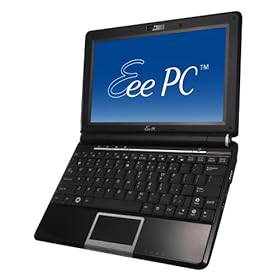
Well , when the whole idea surfaced of mini-laptops , netbooks, UMPC's or whatever your favourite description is for these little PC's is, I thought they could have a great future. Like most people who have worked in IT for many years however, I have heard enough hot air and vapourware announcements to power a hot air ballon around our Galaxy for several millennium. Caution was definitely the order of the day.
It was then with delight that the initial Eeepc 701 that I bought proved to be so useful, and became an immediate favourite. It did have a few limitations, which while not show stoppers, could definitely be improved upon. It was not therefore much of a surprise when Intel and VIA announce new CPU's designed specifically for these new type of machines, they would offer increased battery life for the unit, one of my initial limitations. The other two important things I thought would make these machines a real winner for a much wider audience , were a larger screen and a bigger keyboard.
So about the turn of the year the announcements started, with everyone in Asia it appeared about to launch such an improved device. I looked at all of them with a keen eye, to see if they could offer me the improvements I was looking for. If you looked around, with the likes of HP, MSI, Dell, Acer etc etc, there was a large array of Linux machines going to be made available. I have to say that the Acer Aspire One and the Eeepc 901 both came close, the price being one very important consideration. However, if I was going to replace the original 701, then the new unit had to offer everything I wanted.
Well, Asus then announced their new 1000 series units, with 40GB SSD disk space, 10" screen, Intel Atom processor that seemed to run on fresh air compared to the previous Celeron. A larger keyboard was also something that I would appreciate, and when the price was announced, they were not that much more expensive that their smaller brother the 901.
I have to say the extra expenditure was well worth it, and this new unit has offered the extra facilities that I wanted. Time will tell if there are any little issues that will come out of the woodwork to annoy me, but in the first three weeks, everything I have found out about the unit has been very positive. The increase in battery life is truly exceptional, and delivers 5.5 hrs without fail. The suspend and resume just works with the wifi just reconnecting and the ability to just identify a T-mobile 3G USB key and connect was very impressive. The unit is a little heavier than the 701, but the extra facilities more than compensate for that. Browsing the web and writing documents on the move is a breeze, reading my many digital books is also a real pleasure with the extra screen size. There must be several large laptop manufacturers ripping these little units to pieces in their labs to find out how the heck they do it for this price point. One of the nice new features of this unit is the small row of extra function keys just under the screen. They allow you to change the power usage of the machine, turn off the screens backlight , zoom the screen and start Skype, with just a push of a single button. The two on the right are user definable and can be changed with a built in utility. The addition of bluetooth functionality will be useful to some, but I have to say I have yet to find a use for it.
The software has changed a lot with this release, and Open office has been replaced by Sun's Star Office, which is basically Open Office with some template and filter additions. This move does puzzle me as Star Office is not normally a free item. It could have more to do with the good publicity these units are receiving, so millions of users will get to see Sun's offering. Only Xandros and Sun would know for sure.There have been more games added and I particularly like Mahjong, one of my favourites. Asus have done a deal with Yostore for on-line file storage, which it appears is only available to 901/1000 users. This is again though a service I have never up to now found that useful, but time will tell. It would have been nice to see the version of KDE be bumped up to 3.5, as I use the advanced desktop, when not running Ubuntu from a USB key. It would be really useful if everything worked with Ubuntu, but as I write this it doesn't, and that is one of this units strong points, so I will wait until it does. I have added a few Xandros repositories, which allows me to install some new applications, so all is not lost in the mean time.
I also feel that in the weeks to come with the new Dell 910 Inspiron machine about to be launched that the competition for Linux netbooks that just work is going to intensify. This is excellent news for people who want to start using machines with a low price point of entry and an even better price point for the software they want to run on them. There is no doubt that this choice can only be good for the consumer, as there is now a genuine third way to use an Intel PC. I have felt for a long time that Michael Dell has been totally fed up bowing to the demands of Microsoft, and would have loved the opportunity to use Apples OSX on a line of Dell machines. Being the logical and sensible person he is, it was obvious for selfish reasons, Apple were never going to allow this to happen. Their premium priced hardware is part of their strategy, and it is not something they will give up lightly. He has however discovered a new and better way to achieve this, and Linus Torvalds gave him the answer in the form of Linux. He now has a new and very powerful bargaining chip , and it will be interesting to see how this gets used. The other netbook manufacturers are not going to just give their market share to Dell, but competition can only be good for the products that get produced.
Sunday, 24 August 2008
Linux Mint is a great system to move friends from Microsoft
I'm sure if you have been helping out friends and family with their home PC's for any length of time you will have come across the same problems with any machine that has microsoft windows installed.
They will complain the machine has slowed down, and they can never get anything done these days, and their Internet connection is running so slowly. Especially when I found one machine had been completely cracked and was being used as an email relay for the planet. When you have a quick look at the box, you will find it is riddled with virii and trojans of various kinds. The registry is a mess and they have somewhere in excess of 52 panel tray icons that all start on boot.
The solution I came up with several years ago was to say that I don't support any microsoft products, but if they were prepared to open their minds and try something new, I would guarantee them a less painful web experience and I would support them.
I have done this now with over thirty people, including friends and family members, with the same positive , hassle free results. I started using Mandrake Linux, as it was easy to install, but have started recommending Mint 5 Elyssa as it offers the same features Mandriva Linux does today, it's based on Ubuntu and the developers have done good work with the user interface. It comes in various flavours, but I would recommend the main edition to start.
You can download a cd version to have a look at first, and to check compatibility with your hardware, and then install when you are happy.It comes with all the software you will need to get started, and very easy management tools to add software when needed.
You can also either install crossover office or wine for those one or two microsoft apps they can't do without, but I have found that in only a few cases, unlike an office migration I will blog about shortly.
I think anyone could use this Operating environment for an easy life on line, and for those who have to offer advice and support, why not just make your life that little be easier.
They will complain the machine has slowed down, and they can never get anything done these days, and their Internet connection is running so slowly. Especially when I found one machine had been completely cracked and was being used as an email relay for the planet. When you have a quick look at the box, you will find it is riddled with virii and trojans of various kinds. The registry is a mess and they have somewhere in excess of 52 panel tray icons that all start on boot.
The solution I came up with several years ago was to say that I don't support any microsoft products, but if they were prepared to open their minds and try something new, I would guarantee them a less painful web experience and I would support them.
I have done this now with over thirty people, including friends and family members, with the same positive , hassle free results. I started using Mandrake Linux, as it was easy to install, but have started recommending Mint 5 Elyssa as it offers the same features Mandriva Linux does today, it's based on Ubuntu and the developers have done good work with the user interface. It comes in various flavours, but I would recommend the main edition to start.
You can download a cd version to have a look at first, and to check compatibility with your hardware, and then install when you are happy.It comes with all the software you will need to get started, and very easy management tools to add software when needed.
You can also either install crossover office or wine for those one or two microsoft apps they can't do without, but I have found that in only a few cases, unlike an office migration I will blog about shortly.
I think anyone could use this Operating environment for an easy life on line, and for those who have to offer advice and support, why not just make your life that little be easier.
Sunday, 10 August 2008
Microsoft's current software strategy is bad for the environment
Microsoft software development for as long as I can remember has seemed to work on the basic principal that computer hardware speed and performance will grow infinitely to accommodate their sloppy and wasteful programming techniques.
I have read article after article about the latest software offerings from Microsoft, which have all increased in installation footprint, but have only offered performance increases if you use the latest hardware. Vista is a particularly apropos example of a machine resources hog, with a requirement for at least a multi core processor and at least 2 GB of RAM and 10 GB of harddisk space, just to run the operating system.That is a computer that uses a lot of energy, your money, just to run the basic system that would allow you to do anything. The days of ignoring this are gone, just look at your fuel bills and you will see why. So these machines to run Vista are more expensive to buy , to run and cost the environment more in manufacture.
This seemed to be the way things have always been , and would continue to be, until Intel and Asus combined to create a whole new breed of PC, the netbook or mini laptop. This post is coming from an Asus Eeepc , and with the plethora of other manufacturers jumping on this hot bandwagon, you will be able to get one of these diminutive devices in laptop or desktop format. The intel Atom units have very good battery life, and consume little power compared to a 15" Vista Behemoth laptop.
This however is the crux of this post: The Intel Atom processor and it's VIA counterpart use a fraction of the power of the older generation processors, work perfectly with Linux, require far less internal memory to have the operating system to function properly, and work with solid state hard disks. They are basically green computers, and the more people who use them, the less the environment suffers. Microsoft has got it very wrong for the energy requirements of a modern IT departments demands, and is beginning to look like the General Motors of the software world, building products for a previous age. If I were a CEO of any large company, and my CTO was not investigating the use of low power workstations running Linux, I think I would be looking for a new CTO.
Apple saw this coming, thus the Apple Air and their new mini laptop, so why has Microsoft got this so wrong? I think it tells you a lot about the company, that they always seem to be on the backfoot, technologically, and it is only the lack of action by corporate buyers that keeps there money machine turning.
Microsoft has no software in this arena apart from it's five year old XP, so yet again they have been caught cold when a market changes quickly, and I doubt Windows 7 has currently been designed for this market segment either. I fully suspect that will change, or they may modify their mobile operating system upwards, but they will be playing catch up yet again.
You can also wonder why you might waste money on a super powerful machine, that you then need to spend a small fortune on software for, after your initial purchase, just for it to be vaguely useful. While you can get one of these new machines with everything already installed and ready to go for £250-£300. Yes there are games players and power users who will always need the extra power of a true workstation, but I suspect that 90%, if not more of net users just do not need that type of machine anymore. The prospect of cloud computing with all your applications being supplied on-line, will also drive this market.
So save the environment , do yourself a financial favour and buy a small energy efficient ,useful mini PC with Linux installed.
I have read article after article about the latest software offerings from Microsoft, which have all increased in installation footprint, but have only offered performance increases if you use the latest hardware. Vista is a particularly apropos example of a machine resources hog, with a requirement for at least a multi core processor and at least 2 GB of RAM and 10 GB of harddisk space, just to run the operating system.That is a computer that uses a lot of energy, your money, just to run the basic system that would allow you to do anything. The days of ignoring this are gone, just look at your fuel bills and you will see why. So these machines to run Vista are more expensive to buy , to run and cost the environment more in manufacture.
This seemed to be the way things have always been , and would continue to be, until Intel and Asus combined to create a whole new breed of PC, the netbook or mini laptop. This post is coming from an Asus Eeepc , and with the plethora of other manufacturers jumping on this hot bandwagon, you will be able to get one of these diminutive devices in laptop or desktop format. The intel Atom units have very good battery life, and consume little power compared to a 15" Vista Behemoth laptop.
This however is the crux of this post: The Intel Atom processor and it's VIA counterpart use a fraction of the power of the older generation processors, work perfectly with Linux, require far less internal memory to have the operating system to function properly, and work with solid state hard disks. They are basically green computers, and the more people who use them, the less the environment suffers. Microsoft has got it very wrong for the energy requirements of a modern IT departments demands, and is beginning to look like the General Motors of the software world, building products for a previous age. If I were a CEO of any large company, and my CTO was not investigating the use of low power workstations running Linux, I think I would be looking for a new CTO.
Apple saw this coming, thus the Apple Air and their new mini laptop, so why has Microsoft got this so wrong? I think it tells you a lot about the company, that they always seem to be on the backfoot, technologically, and it is only the lack of action by corporate buyers that keeps there money machine turning.
Microsoft has no software in this arena apart from it's five year old XP, so yet again they have been caught cold when a market changes quickly, and I doubt Windows 7 has currently been designed for this market segment either. I fully suspect that will change, or they may modify their mobile operating system upwards, but they will be playing catch up yet again.
You can also wonder why you might waste money on a super powerful machine, that you then need to spend a small fortune on software for, after your initial purchase, just for it to be vaguely useful. While you can get one of these new machines with everything already installed and ready to go for £250-£300. Yes there are games players and power users who will always need the extra power of a true workstation, but I suspect that 90%, if not more of net users just do not need that type of machine anymore. The prospect of cloud computing with all your applications being supplied on-line, will also drive this market.
So save the environment , do yourself a financial favour and buy a small energy efficient ,useful mini PC with Linux installed.
Sunday, 11 May 2008
Eeepc addons will spark even better Linux supported hardware
While going through my daily technology feeds, I noticed a news item on the new TV adapter that Asus has launched, it's called the ASUS My Cinema-U3100Mini. Now if you look at the operating systems it supports, it includes Debian Linux, which you might know is the basis for a lot of the modern Linux distributions we all use today. These include Xandros, the operating system that comes standard with the Epc , the ever popular K/X/Ubuntu range of operating systems, Mint Linux, and Mepis. All of these are in the top twenty of Distrowatch, which gives a reasonable idea of what people are using.
Now it becomes obvious, even by Asus's conservative projection of expected shipments of Epc's this year, we are looking at a global market of several million customers for these new addon devices with Epc's alone. If you add in all the additonal customers who already use Debian based distro's, which include now the Dell customer base, there is a real market for hard nosed business people to make some serious money, as Asus is displaying on a daily basis.
It also doesn't take a lot to realise that the open nature of Linux development will enable most if not all of these add-on devices to be ported fairly easily to the non-Debian Linux Distributions like Red Hat, Fedora, Suse, PClinuxos etc.
I think that this technical development has several benefits for two groups of people. The business people looking to supply new markets and make sure their products are in at the forefront of a booming new IT sector. You only have to look at the success of the new Ultra mobile laptops from Asus to see what can be achieved. The second group of people who will directly benefit from this are the users of Linux who will now have access to a wider range of add-ons than were previously available.
As I have both an Epc and a Dell XPS m1330 with Ubuntu, I can't wait to get one of these new little devices to watch TV on the move. Those commute train journeys can be so drab on cold winter mornings, so a little light mindless TV can help make them slightly less boring.
Now it becomes obvious, even by Asus's conservative projection of expected shipments of Epc's this year, we are looking at a global market of several million customers for these new addon devices with Epc's alone. If you add in all the additonal customers who already use Debian based distro's, which include now the Dell customer base, there is a real market for hard nosed business people to make some serious money, as Asus is displaying on a daily basis.
It also doesn't take a lot to realise that the open nature of Linux development will enable most if not all of these add-on devices to be ported fairly easily to the non-Debian Linux Distributions like Red Hat, Fedora, Suse, PClinuxos etc.
I think that this technical development has several benefits for two groups of people. The business people looking to supply new markets and make sure their products are in at the forefront of a booming new IT sector. You only have to look at the success of the new Ultra mobile laptops from Asus to see what can be achieved. The second group of people who will directly benefit from this are the users of Linux who will now have access to a wider range of add-ons than were previously available.
As I have both an Epc and a Dell XPS m1330 with Ubuntu, I can't wait to get one of these new little devices to watch TV on the move. Those commute train journeys can be so drab on cold winter mornings, so a little light mindless TV can help make them slightly less boring.
Thursday, 8 May 2008
Six months with the Asus Eeepc mini laptop
After getting one of these little devils for use on my weekly flights and many train journeys, I did wonder if the novelty of the small laptop might wear off.
Well, I can tell you that the little laptop is working harder today than when I first got it, and I have found many uses for the device that I didn't think about when I originally bought it. The one big use that has become more useful by the week, is taking the Epc to meetings, where it can happily take notes and you can surf the web for info on the spot. I know you can do this with 15" laptops, but they always seem to dominate the table space in front of you at a meeting, and in some subconscious way extend a barrier to other people at the meeting. The diminutive Epc doesn't have this problem, and several members of the team have actually bought them for exactly the same task. It also always offers a talking point when working with people from other teams or companies, which is a great ice breaker. It has also proved really useful for displaying photos downloaded from my cameras SD card, which again was not something I originally bought it for, but now find very useful.
I have played around with the installed Linux software only slightly, basically to remove the simple interface it comes with, and use a more standard KDE desktop. I have tried other Linux distributions on USB keys to see how they might work as a replacement, but have found nothing that works as seamlessly as the pre-installed software yet.
The Epc does everything it said it would do well, and having used the wireless connectivity extensively, and recently helped a friend set up a wireless broadband modem on his Epc, you really can connect in the UK from virtually anywhere.
The only problem I can see on the horizon, is not that this little unit will not keep doing the job it was bought for, but it's new big brother with an updated Intel Atom processor which is just around the corner, will cause a problem on the purchasing front.
You see I have already bought a new Dell m1330n with Ubuntu Linux for more concentrated work, so what the heck do I use the original Epc for?
I'm sure I will find a solution in the house somewhere.
Well, I can tell you that the little laptop is working harder today than when I first got it, and I have found many uses for the device that I didn't think about when I originally bought it. The one big use that has become more useful by the week, is taking the Epc to meetings, where it can happily take notes and you can surf the web for info on the spot. I know you can do this with 15" laptops, but they always seem to dominate the table space in front of you at a meeting, and in some subconscious way extend a barrier to other people at the meeting. The diminutive Epc doesn't have this problem, and several members of the team have actually bought them for exactly the same task. It also always offers a talking point when working with people from other teams or companies, which is a great ice breaker. It has also proved really useful for displaying photos downloaded from my cameras SD card, which again was not something I originally bought it for, but now find very useful.
I have played around with the installed Linux software only slightly, basically to remove the simple interface it comes with, and use a more standard KDE desktop. I have tried other Linux distributions on USB keys to see how they might work as a replacement, but have found nothing that works as seamlessly as the pre-installed software yet.
The Epc does everything it said it would do well, and having used the wireless connectivity extensively, and recently helped a friend set up a wireless broadband modem on his Epc, you really can connect in the UK from virtually anywhere.
The only problem I can see on the horizon, is not that this little unit will not keep doing the job it was bought for, but it's new big brother with an updated Intel Atom processor which is just around the corner, will cause a problem on the purchasing front.
You see I have already bought a new Dell m1330n with Ubuntu Linux for more concentrated work, so what the heck do I use the original Epc for?
I'm sure I will find a solution in the house somewhere.
Subscribe to:
Posts (Atom)



 Posts
Posts


