
Tuesday, 30 June 2009
Installing Chromium on Fedora Linux
If you have Fedora Linux installed as your desktop software, there has now been put together a nice easy howto by the guys at Digitizor on how to install the Chromium broswer onto your system. It doesn't cover the Goggle version, but you can build it yourself using the Debian/Ubuntu alien program if you should feel so inclined.


Saturday, 27 June 2009
Only a fool could possibly think Linux is not ready for the desktop
The evidence is everywhere, and it became even more apparent a few seconds ago when I needed to get a few albums for my daughter. I started looking around the airports shops only to find that they have given up selling the old CD hardware. So I thought I will just log on to the net and download them from the Amazon mp3 store, DRM free of course. My laptop connected immediately to the wifi connection, and I was up and connected to a network I had never seen before in seconds.
I have had the Amazon mp3 downloader software on my laptop for a while, so getting them was a 1 minute point and click with my browser, and voila! , they are now on my hard drive. I have just uploaded them to my Ipod mini using Rythmbox , and they are playing a treat.
All this was done on my Dell XPS 1330 with Ubuntu 9.04 Linux happily sitting on the disk, with not a whiff of any of Gates or Jobs proprietary nonsence anywhere. I'm typing this post with the latest version of Googles Chromium browser and feeling very smug ;-)
Would I change any of this for Windows 7 or Snow leopard? Not on your life, why would I possibly want to waste £200 on an OS that comes with zero apps, when I have a fully working fully functioning system that offers so much and delivers on a daily basis.
Which albums I hear you cry. Green Days 21st Century Breakdown and the Gossips Music for Men. They would not normally be my cup of tea, but they are for my daughter.
If you want to free yourself from the Blue screen, costly, virus ridden , expensive, slow , proprietary hell that is Windows and hardware lock-in that is Apples OSX, then just click here.
I have had the Amazon mp3 downloader software on my laptop for a while, so getting them was a 1 minute point and click with my browser, and voila! , they are now on my hard drive. I have just uploaded them to my Ipod mini using Rythmbox , and they are playing a treat.
All this was done on my Dell XPS 1330 with Ubuntu 9.04 Linux happily sitting on the disk, with not a whiff of any of Gates or Jobs proprietary nonsence anywhere. I'm typing this post with the latest version of Googles Chromium browser and feeling very smug ;-)
Would I change any of this for Windows 7 or Snow leopard? Not on your life, why would I possibly want to waste £200 on an OS that comes with zero apps, when I have a fully working fully functioning system that offers so much and delivers on a daily basis.
Which albums I hear you cry. Green Days 21st Century Breakdown and the Gossips Music for Men. They would not normally be my cup of tea, but they are for my daughter.
If you want to free yourself from the Blue screen, costly, virus ridden , expensive, slow , proprietary hell that is Windows and hardware lock-in that is Apples OSX, then just click here.
Friday, 26 June 2009
A funny thing happened on my way to web
I have been testing Firefox 3.5 and Chromium now for a while, and it dawned on me today that I'm using Chromium more and more, even though it is missing some plugins and options. I started to wonder why this might be, given that even in the developers eyes it is a very early release. The plain truth is the speed. I know some sites just don't render properly, like Vaughan-Nichols Linux blog, but I'm prepared to put up with that, because it just flies along. I use it for Gmail, Google reader , Google analytics , my blog, many forums, the BBC and it just works so much faster that I'm prepared to put up with it's foibles.If I do hit an issue I know I can always fall back to Firefox, which is normally the case when I want to watch something with Adobe Flash. This however will disappear the moment Chromium supports Adobe Flash, and we are not now talking many months away from that happening.
The Mozilla community have plenty of time to face the performance issues of Firefox on Linux before either Chromium or Google Chrome are out of the door, but they really are going to have face that daemon ;-)
The issue you see, is that on small power computers like Netbooks, every CPU cycle counts, even more so when the ARM based babies hit the streets, and Chromium with v8 is cutting the mustard now, and I can see many distros. , including the one I help with , Eeebuntu switching to Chromium simply for speed reasons.
I have every confidence that the Mozilla community will step up to the plate and address the issue, as version 3.5 is a big improvement over 3.0, and I it will be interested to see how 3.6 and eventually 4.0 shape up, but they have some real competition now and the Microsoft type complacency just won't be good enough.
If Google delivers on the rumours of a version of Android for the Intel Atom and the ARM processors, then they are going to be pushing Chromium very hard on all platforms, but especially there own, which is Linux at it's heart. The pressure on features like audio, video, Adobe flash, and ogg will be relentless and they have within this development community the talent to deliver these improvements. The pressure to improve these is only going to increase.
These are very interesting browsing times, and the only people to really benefit are the surfers.
The Mozilla community have plenty of time to face the performance issues of Firefox on Linux before either Chromium or Google Chrome are out of the door, but they really are going to have face that daemon ;-)
The issue you see, is that on small power computers like Netbooks, every CPU cycle counts, even more so when the ARM based babies hit the streets, and Chromium with v8 is cutting the mustard now, and I can see many distros. , including the one I help with , Eeebuntu switching to Chromium simply for speed reasons.
I have every confidence that the Mozilla community will step up to the plate and address the issue, as version 3.5 is a big improvement over 3.0, and I it will be interested to see how 3.6 and eventually 4.0 shape up, but they have some real competition now and the Microsoft type complacency just won't be good enough.
If Google delivers on the rumours of a version of Android for the Intel Atom and the ARM processors, then they are going to be pushing Chromium very hard on all platforms, but especially there own, which is Linux at it's heart. The pressure on features like audio, video, Adobe flash, and ogg will be relentless and they have within this development community the talent to deliver these improvements. The pressure to improve these is only going to increase.
These are very interesting browsing times, and the only people to really benefit are the surfers.
Chromium browser config files in Linux
After looking for some time , and poking around in the bug/discussion forums I have found where currently Chromium stores it's variable information, information like stored cookies,url history and option settings. It can be found in your home directory under .config - the full stop shows it to be a hidden directory in *nix. Under there you will find chromium and google-chrome, if you have installed both. In the lower directories you will find a selection of sqlite, JSON and text files which are all very obviously named. This is very useful during my testing to check the database configs and what xml/sql is being written out. It has also given me a chance to get better acquainted with sqlite, which is a great embedded database tool, and worth the effort to learn.
Why there is no .chromium directory is not obvious, but I'm sure there is a reason. Firefox very neatly stores all it's workings under the .mozilla directory, using the same techniques and that works well.
Chromium also uses the .pki/nssdb directory for it's secure certificate storage if you need to have a look at those. After reading several post's it would appear that there is an attempt for the projects to share this database, but time will tell.
There is more information here:
Chromium.org
Why there is no .chromium directory is not obvious, but I'm sure there is a reason. Firefox very neatly stores all it's workings under the .mozilla directory, using the same techniques and that works well.
Chromium also uses the .pki/nssdb directory for it's secure certificate storage if you need to have a look at those. After reading several post's it would appear that there is an attempt for the projects to share this database, but time will tell.
There is more information here:
Chromium.org
Tuesday, 23 June 2009
Firefox 3.5 gets a Release Candidate 3
I have justed checked the nightly builds for Firefox 3.5 and there is now a release candidate 3 been launched on Linux and MAC, and again the windows build is not present but will turn up later.
It appears that there have been a few more bugs found at this stage than Mozilla would have liked, but I would much prefer it slightly late and stable than too early and buggy.
As there are so many hundreds of millions of people who now rely on Firefox every day, it makes sense that the bug crushing gets gone cautiously.
Get it here
Firefox 3.5 RC3
It appears that there have been a few more bugs found at this stage than Mozilla would have liked, but I would much prefer it slightly late and stable than too early and buggy.
As there are so many hundreds of millions of people who now rely on Firefox every day, it makes sense that the bug crushing gets gone cautiously.
Get it here
Firefox 3.5 RC3
Using Ubuntu on a USB drive as my PC
I needed to create a portable PC on a USB drive so that I could have all my data and Linux applications with me at all times. The need was driven by having a machine with Windows Vista pre-installed, that I didn't want to change or use, but the BIOS was enabled to boot from any device.
Here are the items I used to create the setup:
1) Copy of Ubuntu 9.04 desktop
2) 1 Kingston Datatraveller II 2 GB disk to use as a live CD installer
3) 1 16GB Kingston Datatraveller disk to use as the "PC on a USB drive"
4) 1 Dell XPS 1330 with Ubuntu installed
Step 1:
I booted into my Dell and clicked on the USB creator and selected the Ubuntu 9.04 iso image
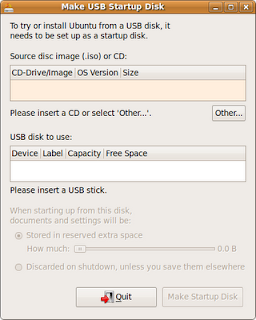 Ubuntu USB Drive Creator
This installed the live Ubuntu CD image onto the 2GB Kinston Datatraveller II ready to be booted from.
Step 2:
Now I put this 2GB Kinston Datatraveller II into one of the USB ports on the Dell XPS and re-booted the machine. The machine now boots off the USB stick, make sure you select your language and to run in live mode, as this allows you access to all of the tools when you want to start to install.
Step 3:
Now place the 16GB Kingston Datatraveller into the other USB slot on the Dell XPS and click on the install icon on the desktop. Everything will be wiped off this USB drive, so make sure you have backed it up . Follow the standard Ubuntu install, but when you get to the disk partitioning, make sure you select the 16GB drive. Be very careful at this stage as you don't want to erase the wrong disk, like your hard drive ;-(. The live CD has the Gparted application available, so you may want to load that up before you start this process and make sure you know which disk is which.
I used the custom disk option and selected the 16GB Kingston Datatraveller, which in my case was /dev/sdc. I only used a single partition, which I formatted ext4, and no swap. It will complain about not having a swap file, but just press continue. This setup is highly unlikely to ever need a swap partition as you are only going to using it for light duties. It would also shorten the life of the USB stick by constantly swapping to it on a machine with little RAM.
Step 4:
The process will continue until you reach a point where you have to press commit, check the details once again and then press Finish. This will format the 16GB Kingston Datatraveller and copy over the operating system.
Voila, you now have an Ubuntu 9.04 PC on a stick. You can store applications and data on there, and it can go where ever you go, very convienient. If you have important data you wish to keep then I would always keep a backup on another data USB stick. Relying on a £30 USB stick to safely store your next million selling SciFi book is not something I would recommend.
I have been using this for months now and have installed Compiz, Google Chromium and Firefox 3.5. The performance has proved to be fine on the following machines:
Dell XPS 1330 3GB Ram
Dell 6400 4GB Ram
Dell D600 1GB Ram
HP DC7700 4GB Ram
HP Pavillion DV9000 2GB Ram
Asus 1000 2GB Ram
Sony Vaio 2GB Ram
Toshiba Sat 1GB Ram
Here are the items I used to create the setup:
1) Copy of Ubuntu 9.04 desktop
2) 1 Kingston Datatraveller II 2 GB disk to use as a live CD installer
3) 1 16GB Kingston Datatraveller disk to use as the "PC on a USB drive"
4) 1 Dell XPS 1330 with Ubuntu installed
Step 1:
I booted into my Dell and clicked on the USB creator and selected the Ubuntu 9.04 iso image
 Ubuntu USB Drive Creator
This installed the live Ubuntu CD image onto the 2GB Kinston Datatraveller II ready to be booted from.
Step 2:
Now I put this 2GB Kinston Datatraveller II into one of the USB ports on the Dell XPS and re-booted the machine. The machine now boots off the USB stick, make sure you select your language and to run in live mode, as this allows you access to all of the tools when you want to start to install.
Step 3:
Now place the 16GB Kingston Datatraveller into the other USB slot on the Dell XPS and click on the install icon on the desktop.
I used the custom disk option and selected the 16GB Kingston Datatraveller, which in my case was /dev/sdc. I only used a single partition, which I formatted ext4, and no swap. It will complain about not having a swap file, but just press continue. This setup is highly unlikely to ever need a swap partition as you are only going to using it for light duties. It would also shorten the life of the USB stick by constantly swapping to it on a machine with little RAM.
Step 4:
The process will continue until you reach a point where you have to press commit, check the details once again and then press Finish. This will format the 16GB Kingston Datatraveller and copy over the operating system.
Voila, you now have an Ubuntu 9.04 PC on a stick. You can store applications and data on there, and it can go where ever you go, very convienient. If you have important data you wish to keep then I would always keep a backup on another data USB stick. Relying on a £30 USB stick to safely store your next million selling SciFi book is not something I would recommend.
I have been using this for months now and have installed Compiz, Google Chromium and Firefox 3.5. The performance has proved to be fine on the following machines:
Dell XPS 1330 3GB Ram
Dell 6400 4GB Ram
Dell D600 1GB Ram
HP DC7700 4GB Ram
HP Pavillion DV9000 2GB Ram
Asus 1000 2GB Ram
Sony Vaio 2GB Ram
Toshiba Sat 1GB Ram
Linux Chromium browser additional features added
 Chromium new options screenshot
I downloaded the latest version of chromium for Linux on my Ubuntu Dell XPS 1330 this evening to have a look at converting the .deb files to rpms for another machine running Redhat using the Debian Alien utility, and I noticed the version had been bumped again to 3.0.191. So I gave it a quick once over and noticed that the options menu item "Personal Stuff" has become populated with considerably more choices. Here is a screen grab of the new options, which offer amongst other new features the ability to save your site specific passwords and manage them.
Subscribe to:
Posts (Atom)



 Posts
Posts


