Showing posts with label Microsoft windows. Show all posts
Wednesday, 12 March 2014
Setting up Adobe Flash with Wine and Windows Firefox on Linux - all to get VMware vSphere working in a browser
As I regularly need to use vmware software for a lot of cloud implementations , it has become more of a pain to keep switching to a virtual machine just to allow me to use a later version of Flash, that Adobe no longer supports in Linux. This is because VMware in their wisdom have decided that the web version of vSPhere management will only work with Flash version 11.5 and above.
So I decide today to do something about it, and make it easier.
Here are the steps to get it working.
1) Install wine from your Distros repos - or download the latest from WineHQ
2) If you are behind a proxy make sure you have http_proxy set - if this doesn't work then use this util to set the proxy in Wine - Proxycfg.exe - links at bottom
e.g. wine Proxycfg.exe -p http://myproxy-server.co.uk:8080
3) Download and install a Windows version of Firefox from the link below
e.g. chmod u+x Firefox Setup 27.0.1.exe ; wine Firefox Setup 27.0.1.exe
4) Download the version of Adobe flash I point to in the links - don't go to the Adobe page it doesn't work for me.
5) Run the command "wine install_adobe_flash_11_plugin.exe" and just follow the instructions.
6) Start up firefox with wine, and heh presto you can now connect to the vSphere console, and go to other Adobe sites if you like.
Hope this saves people time when trying to do the same.
Latest stable Windows version of Firefox
Copy of the Proxycfg.exe file for configuring wines proxy settings
The version of Adobe Flash I found to work with Ubuntu 12.04 - wine version 1.4
Wine help on how to use Proxycfg.exe - search page for proxy
Friday, 5 April 2013
Using an encrypted git repository on Dropbox to store my puppet code in the Cloud.
Today, most technologists have said they love the cloud storage paradigm and to have files and configs at their finger tips , no matter where they are , or how they access them.
Dropbox was arguably the first, easiest and globally available cloud storage solution out their, and it's the one I continue to use today. Like all cloud solutions - apart from owncloud - they have one drawback, who else can look at your files? This tends to make users suspicious and cautious about what they are prepared to store in the cloud, me too. As I control various ssh keys with my puppet code, I certainly don't want people having access to these.
So the solution I found was Truecrypt - a great open source project that allows you to create encrypted volumes that you can mount on all popular operating systems, including Linux, OSX and Microsoft. As I use all three of these systems at various times, it gives me great coverage. In the post PC era, it would be nice to see IOS and Android versions available in the future, but in all honesty I have not seen a real need yet.
My purposes only required a small amount of space, as code does not generally take up too much room, so I only made it 10MB. Your mileage may vary of course. There are good tutorials on the Truecrypt web site, and if you like what you see, then please donate to the project.
Once Truecrypt has been installed , created your volume and you have mounted it , you can now create your git repository using standard git commands like so:
git init --bare project.git
You can then take the project you have been working on your local hard drive, and commit it to your new git repo, like so
git remote add origin /media/truecrypt1/git/project.git
git push -u origin master
That's all there is too it, so now I have my puppet git repository where ever I go, and I can very quickly bring a machine up to my requirements with all the settings and packages I need to get work done with puppet and a few git commands. It literally saves hours of time, and I can rest easy in the knowledge it is safe in the cloud.
You can obviously use Truecrypt for storing all sorts of other things in the cloud, as I do. If you want to make sure only you can see sensitive data then this a good way to go.
Thursday, 5 November 2009
Is ranting about Microsoft Windows on a par with being a religious zealot
Having studied evolutionary biology for most of my life, an interest I picked up in school, I have read a lot about many facets of the Theory, and one side junction from this is the concept of Memes. This has been described as a social/cultural equivalent to genetics and has many postive qualities that has helped the progress of Homo Sapians to evolve to our current state.
One simple example of this is the ability of parents to pass on to their children the concept that swimming with crocodiles is not a good idea for the families genetic advancement, but I think you get the picture. This has also been used as an example for the worldwide adoption of many types of religions that get handed down through the ages from parents to children with not an ounce of evidence but just firm beliefs.
This has led me on to thinking about some peoples rabid support for Microsoft Windows when the facts presented to everyone run completely contrary to the evidence. I would argue that it is Memes at play here , and I'm sure that Microsoft use this to their advantage. This post isn't going to bash Windows or put forward Linux per se, I use both and they both have there place. It just facinates me why people can firstly be so "religious" about an operating system - removing Microsofts huge PR campaigns for an instance. I have used Apples MAC OSX and it is a good system, it has some issues, but for a home user it has many advantages. It's one big draw back for me is the cost of the hardware, but thats just personal. I have used BSD, Solaris etc, and they are also good and have there place in the operating system eco system. I use Microsoft XP in a virtual machine for certain non-other-os applications, and it works fine in that role.
I choose to use Linux for many reasons, none of them fanatically idealogical. The first is that it is intellectually interesting to working within a software development environment where you can be actively involved, which I am. I talk regularly to many developers of many systems about issues and bugs, try doing that with Apple or Microsoft. The software that the various communities produce is of a very high standard and can be used in many interesting and diverse scenarios, with everything from running my desktop to type this blog post, to a mutli-million pound cloud infrastructure, all with the same basic building blocks. I also enjoy the freedom that the developers have to create many interesting and complete solutions to web based problems, just look at the most famous open source project of them all Firefox. They can just grab the components they want without worrying about costs or licenses, and I know personally that is a big plus for me.
I feel that people who enjoy the variety that the modern software world has to offer have open minds and are happy to explore new ideas and paradigms, and that the closed minds just follow the hurd into the same old ways of doing things, the Microsoft way. This is my experience and your mileage may vary, but how many MCSE's do you know would install an Apache Tomcat server to just get the job done, instead of trying to stear the entire project to use .NET?
It appears to boil down to one simple fact, that Microsoft got there first and have placed their Memes firmly in place, and like religion , it is going to take one hell of a lot of shifting. I feel with things like Andoid and Maemo people will see on their portable devices how good alterantives can be and this will start to break the mold. I also see Googles OS having a major impact to affect change in peoples minds, but it will not be quick or over night.
One thing is perfectly clear though, Redmond are not going to give in without a fight, and they know how to be extremely dirty when they have to. Anyone see the parallels here to jealous, religious zealots? I certainly do.
One simple example of this is the ability of parents to pass on to their children the concept that swimming with crocodiles is not a good idea for the families genetic advancement, but I think you get the picture. This has also been used as an example for the worldwide adoption of many types of religions that get handed down through the ages from parents to children with not an ounce of evidence but just firm beliefs.
This has led me on to thinking about some peoples rabid support for Microsoft Windows when the facts presented to everyone run completely contrary to the evidence. I would argue that it is Memes at play here , and I'm sure that Microsoft use this to their advantage. This post isn't going to bash Windows or put forward Linux per se, I use both and they both have there place. It just facinates me why people can firstly be so "religious" about an operating system - removing Microsofts huge PR campaigns for an instance. I have used Apples MAC OSX and it is a good system, it has some issues, but for a home user it has many advantages. It's one big draw back for me is the cost of the hardware, but thats just personal. I have used BSD, Solaris etc, and they are also good and have there place in the operating system eco system. I use Microsoft XP in a virtual machine for certain non-other-os applications, and it works fine in that role.
I choose to use Linux for many reasons, none of them fanatically idealogical. The first is that it is intellectually interesting to working within a software development environment where you can be actively involved, which I am. I talk regularly to many developers of many systems about issues and bugs, try doing that with Apple or Microsoft. The software that the various communities produce is of a very high standard and can be used in many interesting and diverse scenarios, with everything from running my desktop to type this blog post, to a mutli-million pound cloud infrastructure, all with the same basic building blocks. I also enjoy the freedom that the developers have to create many interesting and complete solutions to web based problems, just look at the most famous open source project of them all Firefox. They can just grab the components they want without worrying about costs or licenses, and I know personally that is a big plus for me.
I feel that people who enjoy the variety that the modern software world has to offer have open minds and are happy to explore new ideas and paradigms, and that the closed minds just follow the hurd into the same old ways of doing things, the Microsoft way. This is my experience and your mileage may vary, but how many MCSE's do you know would install an Apache Tomcat server to just get the job done, instead of trying to stear the entire project to use .NET?
It appears to boil down to one simple fact, that Microsoft got there first and have placed their Memes firmly in place, and like religion , it is going to take one hell of a lot of shifting. I feel with things like Andoid and Maemo people will see on their portable devices how good alterantives can be and this will start to break the mold. I also see Googles OS having a major impact to affect change in peoples minds, but it will not be quick or over night.
One thing is perfectly clear though, Redmond are not going to give in without a fight, and they know how to be extremely dirty when they have to. Anyone see the parallels here to jealous, religious zealots? I certainly do.
Wednesday, 14 October 2009
Building a secure bank account access virtual machine with Windows and Ubuntu
If you use your computer for accessing your bank accounts, and you use Microsoft Windows , you should be very worried at this moment in time if any of the following are not upto date:
1) Your Anti-virus
2) You Anti Spyware
3) Your Trojan detection
4) Your firewall software - all of them including zone alarm
5) You Anti-keylogger
If you don't know what any of the above are, then I recommend you immediately turn off you PC and speak to someone who does, as cyber fraud with Microsoft Windows is currently rampent and on the increase.
Having used Unix/Linux for many years, the above problems are massively reduced on that platform, and I therefore thought of a way to keep my Microsoft user friends safe as well.
So without further ado, here is what to do:
Step 1: Go to the following web site and download a piece of software for Windows, that will allow us to run Linux on top of it, without you having to change anything within Windows. You will need to be administrator to install this.
Virtual Box Downloads
Once you have this installed this we can then move onto the next step.
Step 2: Download a copy of Ubuntu Linux from the following web site. This file is of a type "ISO", you don't need to understand what that is, but we are going to use it to install our new "virtual machine". Note exactly where you store this on your machine, as we need this information later
Ubuntu Linux software
Step 3:
Load your virtual box software and click on the new virtual machine box - there are fantastic documents on the virtual box website to help but I will show a quick graphical install here. You can leave all the settings as defaults, just click next, and you can put the files into your My Document folder:

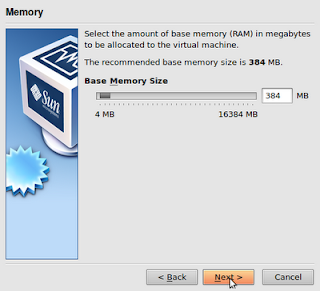
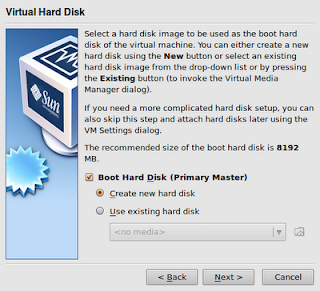
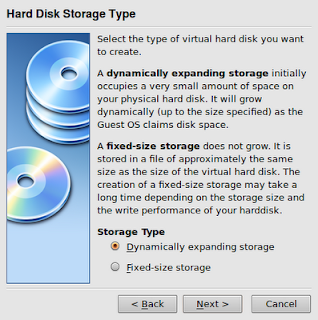
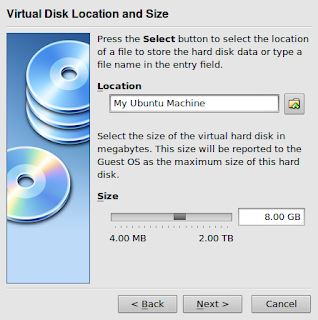
Just click on Finish and you have the bare bones of your new machine.
You now need to click on the settings button for your new virtual machine, as we are going to tell it where to find it - it's where you downloaded it from the Ubuntu web site.
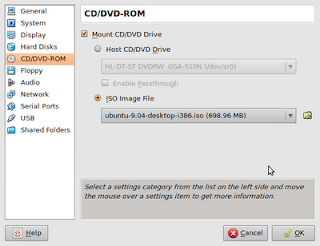
You will be prompted with another screen , and you just need to select your downloaded "ISO" file. Just click on the ADD button and select the location.
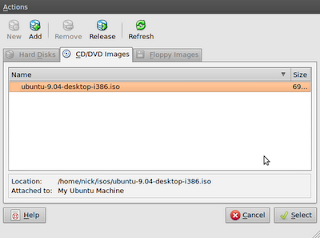
Step 4: Lets test what we have.
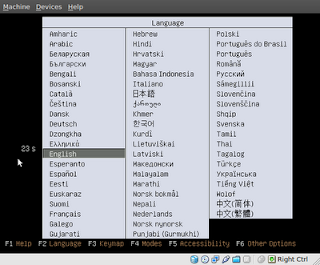
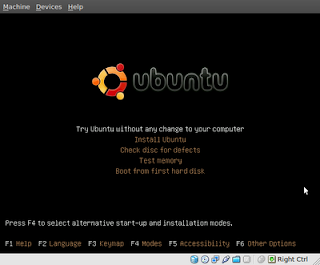
Click on the Start button, and your new virtual machine will burst into life, just select your language and the try before install option, and that is it. This virtual machine in it's current state can not be written too, so no bad software can be installed, but it also means you would need to install Flash or Java everytime if your bank requires it. See below.
Step 5:
The next decision is upto you. You can either leave it like this and be super safe, but need to do some work each time you need to access the bank , or you can now install it into this new virtual machine and again only use it for your secure on-line communications, and never download anything apart from security updates to it. The beauty of Virtual box is the fast suspend and resume facility, which makes using this software a breeze.
Now I know for some this may seem difficult, but with a little reading and asking around it is not beyond most computer literate people. The question you really have to ask yourself, is what would you do if someone empties your bank account, how much pain would that cause you?
1) Your Anti-virus
2) You Anti Spyware
3) Your Trojan detection
4) Your firewall software - all of them including zone alarm
5) You Anti-keylogger
If you don't know what any of the above are, then I recommend you immediately turn off you PC and speak to someone who does, as cyber fraud with Microsoft Windows is currently rampent and on the increase.
Having used Unix/Linux for many years, the above problems are massively reduced on that platform, and I therefore thought of a way to keep my Microsoft user friends safe as well.
So without further ado, here is what to do:
Step 1: Go to the following web site and download a piece of software for Windows, that will allow us to run Linux on top of it, without you having to change anything within Windows. You will need to be administrator to install this.
Virtual Box Downloads
Once you have this installed this we can then move onto the next step.
Step 2: Download a copy of Ubuntu Linux from the following web site. This file is of a type "ISO", you don't need to understand what that is, but we are going to use it to install our new "virtual machine". Note exactly where you store this on your machine, as we need this information later
Ubuntu Linux software
Step 3:
Load your virtual box software and click on the new virtual machine box - there are fantastic documents on the virtual box website to help but I will show a quick graphical install here. You can leave all the settings as defaults, just click next, and you can put the files into your My Document folder:


Just click on Finish and you have the bare bones of your new machine.
You now need to click on the settings button for your new virtual machine, as we are going to tell it where to find it - it's where you downloaded it from the Ubuntu web site.

You will be prompted with another screen , and you just need to select your downloaded "ISO" file. Just click on the ADD button and select the location.

Step 4: Lets test what we have.
Click on the Start button, and your new virtual machine will burst into life, just select your language and the try before install option, and that is it. This virtual machine in it's current state can not be written too, so no bad software can be installed, but it also means you would need to install Flash or Java everytime if your bank requires it. See below.


Step 5:
The next decision is upto you. You can either leave it like this and be super safe, but need to do some work each time you need to access the bank , or you can now install it into this new virtual machine and again only use it for your secure on-line communications, and never download anything apart from security updates to it. The beauty of Virtual box is the fast suspend and resume facility, which makes using this software a breeze.
Now I know for some this may seem difficult, but with a little reading and asking around it is not beyond most computer literate people. The question you really have to ask yourself, is what would you do if someone empties your bank account, how much pain would that cause you?
Subscribe to:
Posts (Atom)