
I know I use Ubuntu on virtually every machine I own or work with , and I enjoy all the benefits that it gives me. However without all the hard work and development of the Debian project none of this would be possible. There are many other distributions out there that directly or indirectly owe their existence to this project, including the likes of Mint, Xandros, Mepis , Eeebuntu ....
I also know that the Ubuntu developers feed back many of their changes to make the desktop experience easier for all users , and that in turn helps the Debian project. I also think that the new awareness that great distributions like Fedora, Suse and Ubuntu have brought to the land of Linux will also bring attention to one of the pillars of our community, upon which so much is built.
I would recommend everyone who reads this and uses one of the many Debian derivative distributions just to pop over and look at their web site, and see the tremendous work that goes on there. You see, it could be the great work in some of the less well known hardware architectures, ARM, that could eventually spell the beginning of the end to the ludicrous software monopoly that has existed over the last decade.
I for one am very grateful to all their hard work, and would like to say thanks.
Showing posts with label Xandros. Show all posts
Showing posts with label Xandros. Show all posts
Wednesday, 18 February 2009


Wednesday, 14 January 2009
Six months with my Eeepc 1000 and still very happy
Yes, it's been that long since I upgraded my netbook, and I can honestly say there has not been one second of regret. Looking at the prices you can get them for today, it might have been worth waiting until after Christmas, but that is always true of all technology , and you would probably end up getting nothing.
In my previous post on this great little machine , I mentioned that I had upgraded from my original 701 model to get a couple of issues sorted, screen size and keyboard size being the main ones. These have proved to be successfully cured and are now a none issue on this netbook. One major added bonus is the increase in battery life , which really does deliver 5.5hrs after every charge.
The operating system that came pre-installed worked effectively enough , Xandros, and had all the applications one could possibly want in a netbook style computer. It would make sense for most people who just want a netbook to get some work done effectively and without much fuss to leave it at that.I however have now switched all my machines over the last twelve months to using Debian derived Ubuntu Linux, and I really wanted to install this on my 1000.
After much searching of the web and playing with various versions, I have now become formally involved with Eeebuntu Linux for the eeepc's and I have to say it really makes this little PC shine. I think one of the unsung heroes of the efforts to successfully using Ubuntu on this platform is Adam, who has put in a considerable amount of effort to make sure as much as possible works out of the iso.
To be fair , the main Ubuntu project has also made our lives over at Eeebuntu HQ much easier with the introduction of the USB key installer with the latest release of Ubuntu, 8.10. This utility makes trying out as many distro's as you like on the Eeepc as simple as possible. I would certainly recommend people to test drive the new environment from a USB stick before installing to make sure they like it.
Have I found any problems with this netbook? Well not with the unit itself, but with the fact that the very latest netbooks now have 3G capabilities built in, rather than having to use a USB modem. The 1000 works perfectly with them, but it does make it so much tidier to have the SIM card internal to the device, but thats being really picky. Apart from that, I can't think there is much I would change. The black case can show your figure marks from time to time, but nothing a cloth can't rectify in moments and I'm really straining here to make that point.
So in conclusion, I'm very glad I bought this unit, use it regularly and will continue to do so until someone comes up with a netbook that has everything this one does , plus some features that make me take notice. That hasn't happened yet, and I suspect it will be a complete technology refresh from the underlying components, like a new more efficient Intel processor that will cause this to happen. It could be a touch screen, although I'm not convinced that would be that useful on these machines, but I would be prepared to take a look.
In my previous post on this great little machine , I mentioned that I had upgraded from my original 701 model to get a couple of issues sorted, screen size and keyboard size being the main ones. These have proved to be successfully cured and are now a none issue on this netbook. One major added bonus is the increase in battery life , which really does deliver 5.5hrs after every charge.
The operating system that came pre-installed worked effectively enough , Xandros, and had all the applications one could possibly want in a netbook style computer. It would make sense for most people who just want a netbook to get some work done effectively and without much fuss to leave it at that.I however have now switched all my machines over the last twelve months to using Debian derived Ubuntu Linux, and I really wanted to install this on my 1000.
After much searching of the web and playing with various versions, I have now become formally involved with Eeebuntu Linux for the eeepc's and I have to say it really makes this little PC shine. I think one of the unsung heroes of the efforts to successfully using Ubuntu on this platform is Adam, who has put in a considerable amount of effort to make sure as much as possible works out of the iso.
To be fair , the main Ubuntu project has also made our lives over at Eeebuntu HQ much easier with the introduction of the USB key installer with the latest release of Ubuntu, 8.10. This utility makes trying out as many distro's as you like on the Eeepc as simple as possible. I would certainly recommend people to test drive the new environment from a USB stick before installing to make sure they like it.
Have I found any problems with this netbook? Well not with the unit itself, but with the fact that the very latest netbooks now have 3G capabilities built in, rather than having to use a USB modem. The 1000 works perfectly with them, but it does make it so much tidier to have the SIM card internal to the device, but thats being really picky. Apart from that, I can't think there is much I would change. The black case can show your figure marks from time to time, but nothing a cloth can't rectify in moments and I'm really straining here to make that point.
So in conclusion, I'm very glad I bought this unit, use it regularly and will continue to do so until someone comes up with a netbook that has everything this one does , plus some features that make me take notice. That hasn't happened yet, and I suspect it will be a complete technology refresh from the underlying components, like a new more efficient Intel processor that will cause this to happen. It could be a touch screen, although I'm not convinced that would be that useful on these machines, but I would be prepared to take a look.
Sunday, 31 August 2008
The Eeepc 1000 - what a great machine
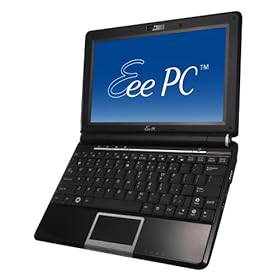
Well , when the whole idea surfaced of mini-laptops , netbooks, UMPC's or whatever your favourite description is for these little PC's is, I thought they could have a great future. Like most people who have worked in IT for many years however, I have heard enough hot air and vapourware announcements to power a hot air ballon around our Galaxy for several millennium. Caution was definitely the order of the day.
It was then with delight that the initial Eeepc 701 that I bought proved to be so useful, and became an immediate favourite. It did have a few limitations, which while not show stoppers, could definitely be improved upon. It was not therefore much of a surprise when Intel and VIA announce new CPU's designed specifically for these new type of machines, they would offer increased battery life for the unit, one of my initial limitations. The other two important things I thought would make these machines a real winner for a much wider audience , were a larger screen and a bigger keyboard.
So about the turn of the year the announcements started, with everyone in Asia it appeared about to launch such an improved device. I looked at all of them with a keen eye, to see if they could offer me the improvements I was looking for. If you looked around, with the likes of HP, MSI, Dell, Acer etc etc, there was a large array of Linux machines going to be made available. I have to say that the Acer Aspire One and the Eeepc 901 both came close, the price being one very important consideration. However, if I was going to replace the original 701, then the new unit had to offer everything I wanted.
Well, Asus then announced their new 1000 series units, with 40GB SSD disk space, 10" screen, Intel Atom processor that seemed to run on fresh air compared to the previous Celeron. A larger keyboard was also something that I would appreciate, and when the price was announced, they were not that much more expensive that their smaller brother the 901.
I have to say the extra expenditure was well worth it, and this new unit has offered the extra facilities that I wanted. Time will tell if there are any little issues that will come out of the woodwork to annoy me, but in the first three weeks, everything I have found out about the unit has been very positive. The increase in battery life is truly exceptional, and delivers 5.5 hrs without fail. The suspend and resume just works with the wifi just reconnecting and the ability to just identify a T-mobile 3G USB key and connect was very impressive. The unit is a little heavier than the 701, but the extra facilities more than compensate for that. Browsing the web and writing documents on the move is a breeze, reading my many digital books is also a real pleasure with the extra screen size. There must be several large laptop manufacturers ripping these little units to pieces in their labs to find out how the heck they do it for this price point. One of the nice new features of this unit is the small row of extra function keys just under the screen. They allow you to change the power usage of the machine, turn off the screens backlight , zoom the screen and start Skype, with just a push of a single button. The two on the right are user definable and can be changed with a built in utility. The addition of bluetooth functionality will be useful to some, but I have to say I have yet to find a use for it.
The software has changed a lot with this release, and Open office has been replaced by Sun's Star Office, which is basically Open Office with some template and filter additions. This move does puzzle me as Star Office is not normally a free item. It could have more to do with the good publicity these units are receiving, so millions of users will get to see Sun's offering. Only Xandros and Sun would know for sure.There have been more games added and I particularly like Mahjong, one of my favourites. Asus have done a deal with Yostore for on-line file storage, which it appears is only available to 901/1000 users. This is again though a service I have never up to now found that useful, but time will tell. It would have been nice to see the version of KDE be bumped up to 3.5, as I use the advanced desktop, when not running Ubuntu from a USB key. It would be really useful if everything worked with Ubuntu, but as I write this it doesn't, and that is one of this units strong points, so I will wait until it does. I have added a few Xandros repositories, which allows me to install some new applications, so all is not lost in the mean time.
I also feel that in the weeks to come with the new Dell 910 Inspiron machine about to be launched that the competition for Linux netbooks that just work is going to intensify. This is excellent news for people who want to start using machines with a low price point of entry and an even better price point for the software they want to run on them. There is no doubt that this choice can only be good for the consumer, as there is now a genuine third way to use an Intel PC. I have felt for a long time that Michael Dell has been totally fed up bowing to the demands of Microsoft, and would have loved the opportunity to use Apples OSX on a line of Dell machines. Being the logical and sensible person he is, it was obvious for selfish reasons, Apple were never going to allow this to happen. Their premium priced hardware is part of their strategy, and it is not something they will give up lightly. He has however discovered a new and better way to achieve this, and Linus Torvalds gave him the answer in the form of Linux. He now has a new and very powerful bargaining chip , and it will be interesting to see how this gets used. The other netbook manufacturers are not going to just give their market share to Dell, but competition can only be good for the products that get produced.
Thursday, 8 May 2008
Six months with the Asus Eeepc mini laptop
After getting one of these little devils for use on my weekly flights and many train journeys, I did wonder if the novelty of the small laptop might wear off.
Well, I can tell you that the little laptop is working harder today than when I first got it, and I have found many uses for the device that I didn't think about when I originally bought it. The one big use that has become more useful by the week, is taking the Epc to meetings, where it can happily take notes and you can surf the web for info on the spot. I know you can do this with 15" laptops, but they always seem to dominate the table space in front of you at a meeting, and in some subconscious way extend a barrier to other people at the meeting. The diminutive Epc doesn't have this problem, and several members of the team have actually bought them for exactly the same task. It also always offers a talking point when working with people from other teams or companies, which is a great ice breaker. It has also proved really useful for displaying photos downloaded from my cameras SD card, which again was not something I originally bought it for, but now find very useful.
I have played around with the installed Linux software only slightly, basically to remove the simple interface it comes with, and use a more standard KDE desktop. I have tried other Linux distributions on USB keys to see how they might work as a replacement, but have found nothing that works as seamlessly as the pre-installed software yet.
The Epc does everything it said it would do well, and having used the wireless connectivity extensively, and recently helped a friend set up a wireless broadband modem on his Epc, you really can connect in the UK from virtually anywhere.
The only problem I can see on the horizon, is not that this little unit will not keep doing the job it was bought for, but it's new big brother with an updated Intel Atom processor which is just around the corner, will cause a problem on the purchasing front.
You see I have already bought a new Dell m1330n with Ubuntu Linux for more concentrated work, so what the heck do I use the original Epc for?
I'm sure I will find a solution in the house somewhere.
Well, I can tell you that the little laptop is working harder today than when I first got it, and I have found many uses for the device that I didn't think about when I originally bought it. The one big use that has become more useful by the week, is taking the Epc to meetings, where it can happily take notes and you can surf the web for info on the spot. I know you can do this with 15" laptops, but they always seem to dominate the table space in front of you at a meeting, and in some subconscious way extend a barrier to other people at the meeting. The diminutive Epc doesn't have this problem, and several members of the team have actually bought them for exactly the same task. It also always offers a talking point when working with people from other teams or companies, which is a great ice breaker. It has also proved really useful for displaying photos downloaded from my cameras SD card, which again was not something I originally bought it for, but now find very useful.
I have played around with the installed Linux software only slightly, basically to remove the simple interface it comes with, and use a more standard KDE desktop. I have tried other Linux distributions on USB keys to see how they might work as a replacement, but have found nothing that works as seamlessly as the pre-installed software yet.
The Epc does everything it said it would do well, and having used the wireless connectivity extensively, and recently helped a friend set up a wireless broadband modem on his Epc, you really can connect in the UK from virtually anywhere.
The only problem I can see on the horizon, is not that this little unit will not keep doing the job it was bought for, but it's new big brother with an updated Intel Atom processor which is just around the corner, will cause a problem on the purchasing front.
You see I have already bought a new Dell m1330n with Ubuntu Linux for more concentrated work, so what the heck do I use the original Epc for?
I'm sure I will find a solution in the house somewhere.
Subscribe to:
Posts (Atom)






 Posts
Posts


