
Since Firefox 3.5 is now out of the door, I have started to play with Minefield again - the daily trunk builds - and the latest release of the trunk code which is marked as 3.6a1pre, is looking very interesting. There are several stated goals for this release, initial browser start speed improvements and also an enhancement to tab speed as well. Well during this very early phase it would appear on Linux that the start speed has definitely been improved, and even with a large number of tabs to open , the browser loads impressively quickly. Also once loaded the response is good, so things are moving in the right direction.
One of the add-ons I always used to install was Firefox showcase, which mimicked operas and chromiums list of open tabs in a window, but this now comes built into firefox 3.6 and it works well. It's not exactly the same, but an improvement over 3.5.
One of the other major objectives is to integrate the browser seamlessly into your operating system of choice, but there are few signs of that as yet. I feel this is going to be tall order with both Gnome and KDE offering different look and feel, but time will tell.
A rich environment for web based applications so that the boundary between the operating system and the browser starts to blur.This is obviously in the to-do pile, as I use a lot of web applications, there doesn't appear on the surface to have been many changes there yet.
Personalization & Customization will allow you to change theme and add-ons, without having to restart the browser, but again this is in the to-do pile.
There are many other improvements marked for this release, and they are not insignificant:
- Better UI (user interface) for uploading files.
- Common site specific preferences to merge with the site button.
- Button to “convert website to application”.
- Implementation of Aero Glass and Aero Peek.
- File management capabilities (move, copy, delete) to be added to the download manager.
- New tab page (we’ve already seen the Cognitive Shield tab concept).
- “about:me” to offer web browsing statistics.
- Identity management.
- Firefox for Mac will use the OS’s native spell checker and will get Keychain and AppleScript support.
You can get more information here :Firefox 3.6
Tuesday, 7 July 2009


Sunday, 5 July 2009
The total myth of Microsoft usability
While visiting my Brother this weekend, I had a laptop given to me to have a look at , as nothing would allow it to connect to the new Broadband wireless access point. Now as I only ever look at this one laptop for my brother as it has an ancient installed version of XP for a single application, they must use. If the machine was more powerful I would put Ubuntu on it , and run the app in a virtual machine, but it just doesn't have the grunt or virtual firmware support.
The truth is that the machine and the operating system are constantly fighting each other just to boot the machine. It is pathetic to watch a machine with 1GB of RAM take 5 minutes to boot. It is an old Dell Inspiron, but when I boot it with an Ubuntu live CD it flys along. I think in Microsoft's defence, a lot of the disk thrashing is down to the anti virus, anti spyware, download protection etc etc etc. Though you can reason a very goog case that if the OS was well built in the first place, you wouldn't need all this expensive software.
Well I have fought with it for a hour to get Firefox 3.5,Google chrome and flash player onto the machine, and we are there now. It would have taken me 5 minutes with Ubuntu, but still I hear the lie, and it is a lie, that Windows is just easier for the average person.
The truth is that the machine and the operating system are constantly fighting each other just to boot the machine. It is pathetic to watch a machine with 1GB of RAM take 5 minutes to boot. It is an old Dell Inspiron, but when I boot it with an Ubuntu live CD it flys along. I think in Microsoft's defence, a lot of the disk thrashing is down to the anti virus, anti spyware, download protection etc etc etc. Though you can reason a very goog case that if the OS was well built in the first place, you wouldn't need all this expensive software.
Well I have fought with it for a hour to get Firefox 3.5,Google chrome and flash player onto the machine, and we are there now. It would have taken me 5 minutes with Ubuntu, but still I hear the lie, and it is a lie, that Windows is just easier for the average person.
Friday, 3 July 2009
Linux is now very well served by browser apps.
Most users have been happily using Firefox version 3.x which came pre-installed with whichever Linux distro they happen to prefer. This is an extremely well written and capable browser, which has just been given a marvellous speed boost by the latest 3.5 release. Have a look here on my blog for a simple install guide with Linux.
There are however other good browsers now available for Linux, and these include Opera and Chromium. I know the later is still in development, but it is developing extremely quickly and should be out in a beta form shortly. Opera on the other hand , in it's 9.64 release is a very powerful, full featured browser, which can be used as a complete replacement for Firefox if you should like to, and the current stable release is significantly faster than Firefox 3.x, and on a par with Firefox 3.5 in real world usage.
I have also now downloaded and started to use Opera 10 beta, and this has also been given a face lift with more enhancements, like the ability to drag open all your tabs to get at the thumbnails of each page, it's really very useful.

The performance with this latest release appears on the surface to be slightly faster than Firefox 3.5, and not that far of Chromium on.
So the days of just taking the Browser you are given and having to be content are well and truly over, especially when you throw Konqueror and Epiphany into the mix. This is real and tangible evidence that the popularity of Linux on the desktop has never been stronger.
I would love to compare Safari and Internet Explorer on my Linux desktops, but unfortunately the companies behind these products are a little afraid of the competition so are sticking to their legacy systems for now.
There are however other good browsers now available for Linux, and these include Opera and Chromium. I know the later is still in development, but it is developing extremely quickly and should be out in a beta form shortly. Opera on the other hand , in it's 9.64 release is a very powerful, full featured browser, which can be used as a complete replacement for Firefox if you should like to, and the current stable release is significantly faster than Firefox 3.x, and on a par with Firefox 3.5 in real world usage.
I have also now downloaded and started to use Opera 10 beta, and this has also been given a face lift with more enhancements, like the ability to drag open all your tabs to get at the thumbnails of each page, it's really very useful.

The performance with this latest release appears on the surface to be slightly faster than Firefox 3.5, and not that far of Chromium on.
So the days of just taking the Browser you are given and having to be content are well and truly over, especially when you throw Konqueror and Epiphany into the mix. This is real and tangible evidence that the popularity of Linux on the desktop has never been stronger.
I would love to compare Safari and Internet Explorer on my Linux desktops, but unfortunately the companies behind these products are a little afraid of the competition so are sticking to their legacy systems for now.
Thursday, 2 July 2009
How to install Firefox 3.5 on Eeebuntu
Step 1:
Grab the tar file from here Firefox 3.5 and save it into your home directory. If you are using the installed firefox that comes with Eeebuntu, make sure you have the option set so that you can tell firefox where you want to save your files. This can be found under the edit --> preferences menu option.
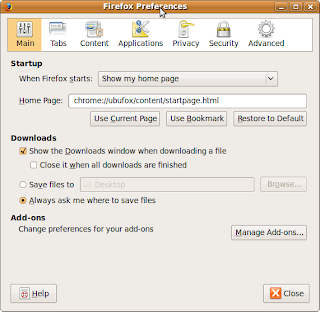
and save the file like this, make sure you select your name.

Step 2:
Now we just need to un-archive this file into your home directory like this at the command line like this.
tar -xjf firefox-3.5.tar.bz2
or
if you don't like the command line you can use the GUI to achieve the same thing like this.
Select the file you downloaded by double clicking on it, and it will open into the archive tool.
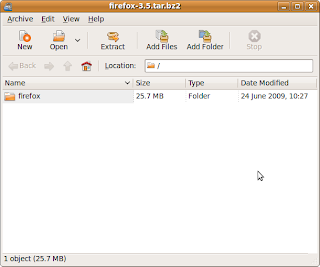
Now just click on extract , make sure you click the "All Files" button, and this will create a new directory in your home directory called Firefox.
Step 3:
Make sure you have closed your old version of firefox, and now you need to create a link on your desktop to your new version of firefox.
The easiest way to do this is to right button click on the desktop, and select the create launcher button, then enter the details like this:
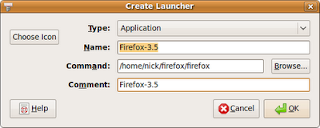
You can change the icon you want to use by clicking on the "Choose Icon" button as part of this process.
Voila, you now have Firefox 3.5 installed and ready to go.
Grab the tar file from here Firefox 3.5 and save it into your home directory. If you are using the installed firefox that comes with Eeebuntu, make sure you have the option set so that you can tell firefox where you want to save your files. This can be found under the edit --> preferences menu option.

and save the file like this, make sure you select your name.

Step 2:
Now we just need to un-archive this file into your home directory like this at the command line like this.
tar -xjf firefox-3.5.tar.bz2
or
if you don't like the command line you can use the GUI to achieve the same thing like this.
Select the file you downloaded by double clicking on it, and it will open into the archive tool.

Now just click on extract , make sure you click the "All Files" button, and this will create a new directory in your home directory called Firefox.
Step 3:
Make sure you have closed your old version of firefox, and now you need to create a link on your desktop to your new version of firefox.
The easiest way to do this is to right button click on the desktop, and select the create launcher button, then enter the details like this:

You can change the icon you want to use by clicking on the "Choose Icon" button as part of this process.
Voila, you now have Firefox 3.5 installed and ready to go.
Wednesday, 1 July 2009
Chromium on Linux changes continue apace

The latest installable version from PPA, today shows a lot of changes in the search engine selection and editing, and the options tab has now been populated under the "Under the Hood" section. The bookmarks manager is now working correctly from the right had selection menu, without having to use the CTRL-B keyboard shortcut.
I think there is no doubt that the team are pushing for a late summer Beta release with a formal release coming in the autumn, as this browser just get's better with each development build.
If you haven't tried it, then I would recommend having a look, as when the beta is released with plugin support, it is going to change the browsing experience on Linux for ever.
Ubuntu getting it's head further into the clouds
Canonical have ramped up there commercial offerings to get businesses to move some or all of there server requirements into the clouds. They are now offering a two pronged attack, with the publicly available Amazon EC2 and now a more secure offering from Canonical based on Ubuntu Server 9.04 and Eucalyptus.
They have plenty of information on their offerings and how to do this for yourself.
Build your own cloud with Ubuntu server 9.04
Build your cloud using Amazons EC2 public offering
They have plenty of information on their offerings and how to do this for yourself.
Build your own cloud with Ubuntu server 9.04
Build your cloud using Amazons EC2 public offering
Firefox 3.5 has been released
Firefox 3.5 has finally shipped , as it is effectively the code that was released for Linux on the 24th June as the third release candidate , second build. There have been many improvements in performance over the previous 3.0 release, and for that alone on many systems it is definitely worth the upgrade. You will benefit from the new javascript engine, the embedded ability to natively play ogg media containers and the new tab functions and features.
I have been using it for many months, and on Linux there are really no issues that I have found. It also works better on your netbooks, and you will notice the difference in speed.
I can heartily recommend it to the eeebuntu community, so get it while it's hot.
Firefox 3.5
We will be looking at building the .deb files for easy installation shortly.
I have been using it for many months, and on Linux there are really no issues that I have found. It also works better on your netbooks, and you will notice the difference in speed.
I can heartily recommend it to the eeebuntu community, so get it while it's hot.
Firefox 3.5
We will be looking at building the .deb files for easy installation shortly.
Subscribe to:
Posts (Atom)



 Posts
Posts


