Smoothwall Firewall project

Thursday, 11 November 2010

Speeding up your Linux browser using a ramdisk


I came across an interesting article yesterday, about someone who had speeded up their browser on Windows by using a ramdisk, and knowing that Linux can happily do this, I decided to write down how to do this for the Linux user.

Firstly we need to create a directory that we can use for the ramdisk, and get it to automatically mount everytime we start our machine.

1) create the directoty - sudo mkdir /var/ramdisk
2) then edit this file and add the following line at the end - gksudo gedit /etc/fstab
/var/ramdisk /var/ramdisk tmpfs size=512m 0 0
3) Now mount this new ramdisk to test
sudo mount /var/ramdisk

We now have our ramdisk, and we can add this to the start options for Chromium and Firefox.

Firstly we will do Chrome as it's the easiest, simple add the following line to the startup options/icon that your use to start Chrome.

--disk-cache-dir=/var/ramdisk

See below:
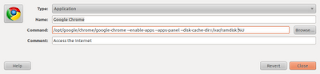

If you now click on Chrome, you will now be using a Ram disk, and you can look at what you are storing in that cache, but looking in the directory you created earlier.

Now, for firefox we use a different method,

Mozilla Firefox

  • Type about:config into the address bar, accept the warning ("I'll be careful, I promise!")
  • Right click > New > String
  • Type browser.cache.disk.parent_directory into the box and press OK
  • Type the path of your BrowserCache directory -- /var/ramdisk press OK
  • Close all open Firefox tabs and windows
  • Open the browser again
(Part of the above section was lifted directly from this web page to save typing - http://goo.gl/RKr7z)

That's it, you now have you cache being stored in RAM instead of on disk, which is significantly faster, for saving and reading cached pages. I have started with a RAM disk of 512m, which may be too large for you or too small, but you can adjust that once you see what your usage profile is like.

Wednesday, 10 November 2010

Is upgrading to the Intel i5 laptop processor worth the effort


In a word, yes . As you may have read on this blog a few weeks ago , I tried an experiment with using an SSD harddisk for the operating system in conjunction with an external 500GB hybrid disk for all the more volatile parts of the OS, like /var and /tmp.

This was a resounding successful with a marked ramp in performance across the whole operating system and applications, to the point now , that all other machines seem like sloth's in comparison.

I had a need to upgrade my work laptop recently, specifically for more CPU cores and access to that lastest hardware virtualization extensions. I use the laptop extensively for virtualization, so I picked the Dell Latitude E6410. This is a really good work horse, but more importantly it comes with the Intel i5 processor.

This has had a very positive affect on the whole systems performance when running virtual guests with VirtualBox - my current virtualization platform of choice - to the extent that I can now over commit on memory and cpu's , plus the density I can achieve on this box has literally doubled.

I always keep a system monitor going to see how hard the system us working, and while on the old E6400, with two virtual machines running , the system would be noticeable slower, now with four virtual guests running, there is still plenty of head room for the other applications I need to run.

If are about to upgrade, and you need the ability to run multiple virtual guests, then I would definitely recommend the extra spend on this processor. The more memory the better, but I'm happily working with 4GB currently, but I can take this up to 8GB if the need should arise.

Well done Dell this is a grand machine for running Linux.

Tuesday, 12 October 2010

Ubuntu 10.10 is released and raises the bar for the Linux desktop again


Well, we have been testing it for five months, and playing with all the new features and functions that the latest software from the open source community can give us. So, if you want to be pleased with just how easy this release is to install or upgrade, then give it a try.

You can read the full release notes at the Ubuntu web site for more detailed information on exactly what each version of this Linux distribution is going to deliver, but it has impressed me on every server, desktop and virtual image I have installed it onto or into, and this post is coming from my just up dated work laptop.

Ubuntu is not every Linux users friend, and I understand some of the resistance, but most open minded open source people can see a definite role for this in the whole open source universe. I use a great deal of Linux, in many different forms, but if you want a desktop that just works, then certainly look no further.

If you are currently using Ubuntu 10.04 LTS, you will need to modify your software sources to allow updates from newer releases, and not just LTS releases. Once you have done that, you will be offered the choice of this new version. This will ask a few simple questions, download about 1,000 files, and prompt you during the process for a few answers. That's it , you are now on the latest version.

An amusing thing about the date of release, is that it was 101010, which in decimal is 42. Douglas Adams has already informed us that this is the meaning of life, the universe and everything, so you can't get much higher praise than that. We can now use this release of Ubuntu to figure out what the question was ;-)

Anyway, go and grab a copy and give it whirl , you won't be disappointed.

Saturday, 2 October 2010

Using SSD and hybrid disks to speed up your computer


I have been reading for a while about the advantages of using SSD disks for starting/booting your computer, which can be especially useful on a laptop, which you are far more likely to restart. Well I decided to put this into action and see what speed improvements these changes would make, and how it would improve the speed in several tests.

The hardware:
Dell Inspiron 6400 Laptop with 4GB Ram and an Intel Core 2 duo P8700 2.5 Ghz
OS Ubuntu 10.04.1 LTS fully patched
Primary new disk drive Kingston SSDnow V+ 64 GB
Secondary disk Seagate Momentus XL hybrid drive 500 GB / 4GB SSD

After considerable thought, and reading that the SSD disk would be good for 1 million reads, I decided that I would use two disk's instead of one, and all variable data would go on the hybrid drive. This would be true for any OS, basically if the partition is going to be written to on a regular basis , then move it onto an external disk. Luckily the Dell comes with a built in eSata connector, which offers really good performance for an external unit, and I wouldn't recommend using USB 2 or firewire unless thats all you have.

I therefore moved the following disk partitions onto the Seagte hybrid drive - /tmp, /var, /home - and made sure that their UUID's were correctly configured on the internal Kingston SSD disk in /etc/fstab. The hybrid Seagate drive is housed in an Icy Box external eSata 2.5" enclosure which works really well.

So to the tests, with the original 2.5" Seagate Momentus 7200 250GB internal disk. I used my stop watch, and with the SSD fitted I suspect some of timings are do my lack of ability to react that quickly.

1) From the end of the BIOS post to a login prompt averaged - 30 seconds
2) Loading firefox 3.6.8 with 25 tabs open - 18 seconds
3) loading Google Chrome with 25 tabs - 10 seconds

with the new configuration

1) From the end of the BIOS post to a login prompt averaged - 5 seconds
2) Loading firefox 3.6.8 with 25 tabs open - 4 seconds
3) loading Google Chrome with 25 tabs - 2 seconds

It is obvious that the new system is significantly faster than it was previously, so the claims being made by the SSD manufacturers are true, your system will be quicker. I would also comment, that everything now works at a much smarter rate, and I have no doubts if I had tested more applications the same performance boost would have been measured.

This was not a cheap experiment however, and the two drives cost me in excess of £250. I was looking for a speed boost with my virtualization requirements, and that is what I have achieved, but unless you have a real need for this performance improvement , then you may well find your money better spent of other needs. I would also now like to try this with the latest Intel processors to see if I can squeeze even more performance out of the laptop.

Tuesday, 7 September 2010

Make using the Command line more fun in Ubuntu

Ubuntu has spawned several really great Linux distributions, and one of the best is Linux Mint. It has always had a feature where-by when you open a command prompt, it displays a simple - often silly - message to brighten up your day before you get stuck in. To be fair this has been around for a long time in the Unix world, but is still funny.Ubuntu doesn't have this turned on by default, so I decided to enable it , and it really isn't that hard, if we borrow a great command from Mint guys.

First you need to install the fortune cookie applications and message files:

sudo apt-get install fortune-mod cowsay

You can test this has installed ok by typing the following:

fortune

and you should get a message displayed.

Next you need to create shell scipt that will do all the hard work for you - borrowed from the Mint guys

sudo vim /usr/bin/ubuntu-fortune

Here is what to put into the file

#!/bin/bash
RANGE=4
number=$RANDOM
let "number %= $RANGE"
case $number in
0)
cow="small"
;;
1)
cow="tux"
;;
2)
cow="koala"
;;
3)
cow="moose"
;;
esac

RANGE=2
number=$RANDOM
let "number %= $RANGE"
case $number in
0)
command="/usr/games/cowsay"
;;
1)
command="/usr/games/cowthink"
;;
esac

/usr/games/fortune | $command -f $cow


Now we need to make this file executable by doing this

sudo chmod +x /usr/bin/ubuntu-fortune


Then last but not least we need to place it into one of the shell script master files so that it gets called every time when you start up a shell script. So edit the following file, and place the command - /usr/bin/ubuntu-fortune - as the last entry in the file.

sudo vim /etc/bash.bashrc

Voila, when you now start a shell terminal , you will have something to laugh at, and you can of course just type the command we created above to get a laugh on got.

Here is an example:


Now there are lots of other fortunes you can install, some of them can be very rude, so be careful, and you can grab these either using apt-get or using the Synaptic package manager.

Have fun.

Tuesday, 24 August 2010

Smartphone users should travel overground and avoid the subways and tubes


If you are one of the many millions of new smartphone owners, it will not have missed your attention that as soon as you go into mole mode and descend into the dark, sweaty, hell that is the subway and tube lines of the western world, than you realise that most of your smartphone functionality disappears. If your commute is a long one, then it can get very annoying.

Well, today while I was sat on the top floor of a double-decker London bus, cruising to work very slowly in the early morning congestion, I realised the value of that service over the tubes. You have full access with your 3G connection and can happily check your email, surf the web and chat on Gtalk without hindrance. Now, I know you can download music with spotify and grab the latest news with the many paid for magazine and news paper apps, but you have to remember to do that before you go under ground. There is the underlying problem, if you have other things on your mind , or a hangover from a previous nights fun, thinking about syncing your smartphone is not top of your pre-journey planning.

So , if you own a smartphone, jump on a bus or grab a cab, and stay well clear of the WIFI/3G retarded tubes. I would however recommend you don't try this on your bicycle ;-)

Monday, 26 July 2010

New Tab Candy with Firefox 4 Alpha build on Ubuntu


I stumbled across this new feature build of Firefox 4 in my daily Google alerts, and I'm really glad that I did.

This new build of Firefox 4 offers a very new feature for tab management , that to be honest is quite frankly very impressive.

It allows you to drag and drop tabs into little organised groups, but you can happily move tabs between these groups if you like.

The best way to have a look at how this works is to view this video by the developers.

Tab Candy Video

I have been using it since I found it, and it really does make your browsing experience so much better, to the point I have started using Firefox a little more often again.

One thing to watch out for though, is don't let this alpha auto-update, as it pulls in the latest FF 4 beta main trunk code, which doesn't have this feature turned on yet. So turn off auto update, and just manually grab the latest builds from the site below.

I would recommend downloading and having a play , and see what you think.

Tab Candy web page and download